Kubecost Alternatives and Kubecost Competitors Compared on Price, Open Source and Automation
Most teams that search for Kubecost alternatives have hit one of four walls: the free tier stops at 250 cores across all clusters, it keeps 15 days of history, the paid tier costs $15,000 a year for the same 250 cores, or the upgrade to Kubecost 3 meant rebuilding the install. The right replacement depends on which wall it was. This page compares ten Kubecost competitors on the three things that decide the purchase: what each one costs on its own price list, whether it needs an agent in your clusters, and whether it only reports the waste or also removes it.
projected this month if unattended
Spend by team
Budget forecast
The short answer
The best Kubecost alternative depends on why you are leaving. OpenCost is the free, Apache 2.0 engine Kubecost is built on and has no core cap. Vantage, CloudZero and Finout allocate Kubernetes cost inside the whole cloud bill, from $0, $19 per $1,000 of monthly spend and $12,000 a year respectively. Datadog Cloud Cost Management costs $5 per $1,000 of spend if you already run Datadog. CAST AI and PerfectScale go further and change the cluster, at $5 and $2 to $4 per CPU a month. Kubecost itself lists $15,000 a year for up to 250 cores on AWS Marketplace.
CostAnalyst is on this list, so here is the plain version first. We are not a namespace-level Kubernetes tool and we do not run in your cluster. We read AWS, Azure and Google Cloud billing and your SaaS subscriptions read-only, allocate the spend per team and product, and publish our prices. Every price below comes from the vendor's own pricing page, documentation or AWS Marketplace listing, and where a vendor publishes nothing we say so instead of repeating a number from someone else's blog.
How we compared
Six things that actually separate these tools
Why teams leave Kubecost in 2026
It is rarely because the cost data is wrong. Kubecost is still the most detailed Kubernetes cost tool there is, and IBM keeps shipping it: version 3.3 added an MCP server in beta and rebuilt namespace turndown. The reasons are structural. The free Foundations tier covers unlimited clusters but only 250 cores in aggregate, and it keeps 15 days of metrics, which rules out any month over month report. The paid tiers carry no price on the IBM pricing page, which kubecost.com/pricing now redirects to. And Kubecost 3.0 was a re-architecture rather than an upgrade: the release notes read "Remove cost-analyzer deployment, Grafana, and Prometheus", ClickHouse became the default data store, and free users "must configure a Federated Storage Bucket when upgrading to 3.0, if they wish to view historical data". IBM's documentation also tells anyone on 2.9 or earlier that images are moving from gcr.io to icr.io. A team that has to redo the install anyway will reasonably ask whether to redo it with something else.
What Kubecost costs today, so you know what to beat
Foundations is free: unlimited clusters up to 250 cores, 15-day metric retention, unlimited users. IBM Kubecost Enterprise, the self-hosted paid edition, has a public offer on AWS Marketplace at $15,000 for twelve months, and the listing says that offer covers up to 250 cores with everything larger sold as a private offer. So the $15,000 does not buy scale. It buys unlimited retention, the multi-cluster view, RBAC, SSO and support on an estate the free tier already covers, which is $5.00 per core a month at the cap. IBM Kubecost Cloud, the hosted edition, lists at $7,950 for twelve months plus $33.40 per core of overage. Above 250 cores there is no public number at all. That is the benchmark: an alternative has to beat free below 250 cores with short history, $15,000 a year if you need history and access control, and a sales quote above that.
An agent in every cluster, or the billing data you already have
Kubecost and OpenCost run inside the cluster and compute cost from what they observe there. That gives pod-level detail and it means one more workload to size, upgrade and secure per cluster. The alternatives split three ways. Vantage and CloudZero also install an agent with Helm, but a light one: Vantage says its agent "does not require dedicated Prometheus pods", and CloudZero's collects pod-level CPU, memory and GPU usage and joins it to the real cost of each node from your bill. Finout takes the other route and reads Kubernetes usage from the Prometheus or Datadog you already run. Datadog needs its own Agent and Cluster Agent, which is free if they are already deployed and a project if they are not. And the cloud providers now put pod-level cost in the bill itself: AWS split cost allocation data for EKS, GKE cost allocation, and the AKS cost analysis add-on. Count your clusters before you choose. At three clusters an in-cluster tool is easy. At sixty it is a platform team's part-time job.
List prices or the bill you actually pay
This is the difference buyers notice last and finance notices first. OpenCost's own FAQ says it reports "the on-demand list pricing for the cloud resources in use by your cluster", and that Kubecost adds "more accurate cost numbers for your cluster after reconciling the differences between your published bill". If you hold Savings Plans, Reserved Instances, committed use discounts or a private pricing agreement, list price overstates every team's cost, often by a wide margin. Tools that start from the invoice (CloudZero, Vantage, Finout, Datadog, the native AWS and Google features, and CostAnalyst) allocate the amount you were charged, discounts included. If the report is going to be used for chargeback, reconciled cost is not optional, and that alone takes plain OpenCost off some shortlists.
A report, or something that changes the cluster
Kubecost is mostly a measurement tool, but it is no longer only that. Kubecost 3.2 brought container resizing Actions back to the free edition, limited to a single cluster, and gave Enterprise customers Resource Quota rightsizing in the same job. It still does not replace your node autoscaler or move workloads to spot capacity. If the reason you are leaving is that the recommendations were never applied, the alternatives are a different category: CAST AI takes over node provisioning, spot and pod sizing, and PerfectScale automates pod requests and limits on its Expert tier. If the reason is that nobody could see who spent what, an automation tool will not fix that, and you want one of the allocation tools above it in the table. Many teams over a few hundred cores end up with one of each.
How the price grows when your clusters grow
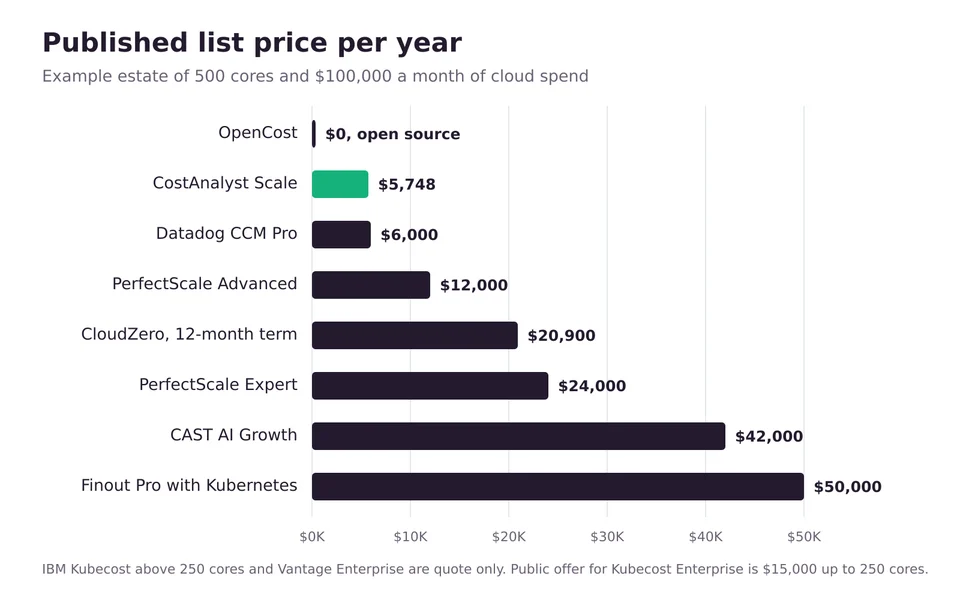
Four price shapes are on offer and they diverge quickly. Per core or CPU: Kubecost at $5.00 per core a month at the cap, CAST AI at $5.00 per managed CPU plus a platform fee, PerfectScale at $2 or $4 per vCPU. Percentage of cloud spend: CloudZero at $19 and Datadog at $5 to $10 per $1,000 of monthly spend. Spend tiers: Finout at $12,000 a year up to $500,000 of annual AWS spend and $40,000 up to $2 million, with Kubernetes cost data adding 25 percent on those two tiers; Vantage at $0, $30 and $200 a month up to $2,500, $7,500 and $20,000 of tracked monthly spend. Flat: CostAnalyst at $59, $179 and $479 a month. For an estate of 500 cores and $100,000 a month of cloud spend, the public list prices work out to about $0 for OpenCost, $5,748 a year for CostAnalyst Scale, $6,000 for Datadog Pro, $12,000 to $24,000 for PerfectScale, $20,900 for CloudZero on a twelve-month term, $42,000 for CAST AI Growth and $50,000 for Finout Pro with Kubernetes. Kubecost and Vantage Enterprise are quotes at that size.
At a glance
10 Kubecost alternatives compared
← Scroll to see all columns →
| Tool | Best for | What it replaces from Kubecost | The catch | Published pricing |
|---|---|---|---|---|
| OpenCost | Teams that want Kubecost's allocation engine with no core cap and no license | Cost by namespace, deployment, label and pod | On-demand list prices, not your reconciled bill; you run and upgrade it | Free, Apache 2.0, CNCF Incubating project |
| Vantage | Kubernetes cost next to the rest of the cloud bill, with a self-serve start | Namespace and label cost reports, plus the non-Kubernetes bill Kubecost does not see | Published tiers stop at $20,000 of tracked monthly spend; above that is Enterprise | Starter free to $2,500 of monthly tracked spend; Pro $30 and Business $200 a month; Enterprise custom |
| CloudZero | Cost per customer, product and feature, with Kubernetes as one input | Allocation by cluster, namespace, workload and label, on real billed cost | Priced on total AWS spend, so you pay for the whole bill to get the Kubernetes view | $19 per $1,000 of monthly AWS spend on AWS Marketplace; about $20,900 a year at $100,000 a month on a 12-month term |
| Finout | Teams that already run Prometheus or Datadog and want no new agent | Kubernetes allocation, shared cost reallocation, anomaly detection | Kubernetes cost data adds 25 percent on the Business and Pro tiers | $12,000 a year up to $500K of annual AWS spend; $40,000 up to $2M (AWS Marketplace) |
| Datadog Cloud Cost Management | Companies that already run the Datadog Agent on every node | Container cost allocation to services and workloads on EKS, ECS, AKS and GKE | Needs the Datadog Agent and Cluster Agent; you pay on all cloud and SaaS spend | Pro $5 and Enterprise $10 per $1,000 of spend a month, billed annually; $6 and $12 month to month |
| CAST AI | Teams leaving Kubecost because the recommendations were never applied | Rightsizing recommendations, by acting on them; adds node and spot automation | Takes over node provisioning from Karpenter or Cluster Autoscaler; not a chargeback tool | Free monitoring plan; Growth $1,000 a month plus $5 per CPU; Enterprise $5,000 a month (AWS Marketplace) |
| PerfectScale by DoiT | Rightsizing visibility for free on small estates, with automation as an upgrade | Request and limit recommendations, workload cost views | Automation is on the Expert tier; paid rates are on Marketplace, not its own site | Free up to 300 vCPU a month; Advanced $2 and Expert $4 per vCPU a month (AWS Marketplace) |
| Native cloud allocation (AWS, Google Cloud, Azure) | Single-cloud teams that only need pod-level cost in the bill | Cost by namespace, workload and label, per cloud | One cloud at a time, no recommendations, and AKS needs the Standard or Premium tier | No license fee; you pay for the query and storage tools you read it with |
| nOps | AWS-first teams that want container cost and commitment management from one vendor | Container cost breakdowns matched to the Cost and Usage Report | No public price; AWS Marketplace shows $1.00 units with no unit defined | Fixed fee based on cloud spend, not published; 14 day free trial |
| CostAnalyst | The number finance signs off: Kubernetes, the rest of the cloud bill and SaaS in one view | Team and product level Kubernetes cost reporting, not namespace-level detail | Read-only and billing-based: no in-cluster agent, no pod-by-pod view, no automation | $59, $179 and $479 a month billed yearly, published; Kubernetes cost on Scale |
Vendors change pricing and packaging often, so confirm the current figure before you buy.
Tool by tool
What each tool is genuinely best at
OpenCost
Best for: Teams that want Kubecost's allocation engine with no core cap and no license
OpenCost is the open source allocation engine Kubecost donated to the CNCF. It was accepted in June 2022 and moved to the Incubating level on 25 October 2024, and it is actively released. There is no 250-core limit and retention is whatever your Prometheus keeps. It supports EKS, AKS, GKE and Oracle OKE, plus on-premises clusters through custom pricing sheets, has its own UI, and now ships an MCP server so an AI assistant can query allocation, asset and cloud costs. What you give up is stated in its own FAQ: it uses on-demand list pricing, while Kubecost reconciles against your bill and adds recommendations, governance, alerting, federated clusters and support. For one or two clusters with a platform engineer who is happy to own it, this is the obvious first stop.
OpenCost compared to CostAnalystVantage
Best for: Kubernetes cost next to the rest of the cloud bill, with a self-serve start
Vantage is a general cloud cost platform with Kubernetes reporting included on every tier rather than sold as an add-on. Its Kubernetes agent is installed with Helm and, in Vantage's words, "does not require dedicated Prometheus pods, it avoids the associated storage costs and scales more easily". The pricing page is unusually open for this category: Starter is free up to $2,500 of tracked monthly spend with three users, Pro is $30 a month up to $7,500, and Business is $200 a month up to $20,000 with twelve months of retention. Past that you are on an Enterprise quote, which is where most companies with real Kubernetes estates will land, so treat the published tiers as a way to evaluate rather than a final price.
Vantage compared to CostAnalystCloudZero
Best for: Cost per customer, product and feature, with Kubernetes as one input
CloudZero answers a different question from Kubecost. Kubecost tells you what a namespace costs. CloudZero tells you what a customer or a product feature costs, and treats Kubernetes as one of the sources. Its Helm-installed agent collects pod-level CPU, memory and GPU usage and combines it with the actual cost of each node from your cloud bill, across EKS, AKS, GKE and OKE. The vendor's own pricing page shows no number, but its AWS Marketplace listing does: CloudZero On Demand is sold in units of $1,000 of monthly AWS spend at $19.00 per unit, with discounts on 12, 24 and 36 month terms. That is cheap for a small estate and adds up quickly on a large one.
See what CloudZero costsFinout
Best for: Teams that already run Prometheus or Datadog and want no new agent
Finout's pitch against Kubecost is about installation. Rather than a proprietary agent, it reads Kubernetes usage from the Prometheus or Datadog setup you already have and merges it with the rest of your cloud and SaaS bills. Its own pricing page describes flat fees by tier of committed spend without figures; the AWS Marketplace listing prices Business at $12,000 a year for up to $500,000 of annual AWS spend and Pro at $40,000 for up to $2 million. Read the feature table before you compare: Kubernetes cost data is a 25 percent price increase on both of those tiers and included only on Enterprise. So the Kubecost-replacing version of Finout Business is $15,000 a year, the same as the Kubecost Enterprise public offer.
See what Finout costsDatadog Cloud Cost Management
Best for: Companies that already run the Datadog Agent on every node
If Datadog is already your observability platform, this is the lowest-friction Kubecost alternative, because the agents that would do the measuring are deployed. Datadog says Cloud Cost Management "automatically allocates the costs of your cloud clusters to individual services and workloads", covering EKS and ECS on AWS, AKS and GKE. It requires Datadog Agent 7.27.0 or later and Cluster Agent 1.11.0 or later. The price list is public: Pro is $5 per $1,000 of cloud and SaaS spend a month on annual billing, $6 month to month and $7.20 on demand; Enterprise is $10, $12 and $15. At $100,000 a month of spend that is $6,000 a year on Pro. If you do not run Datadog, the agent rollout costs far more than the license and this is the wrong choice.
See what Datadog Cloud Cost Management costsCAST AI
Best for: Teams leaving Kubecost because the recommendations were never applied
CAST AI is the alternative for the team that had the reports and never found the time to act on them. It installs a read-only agent that estimates savings, then, once you enable automation, provisions and removes nodes, moves workloads to spot capacity with fallback to on-demand, bin-packs and resizes pods, on EKS, GKE, AKS and Oracle Cloud. Its site shows a quote form; its AWS Marketplace listing shows a full card: a free monitoring plan, Growth at $1,000 a month for up to 500 CPUs, and $0.00694444 per managed CPU-hour, which is $5.00 per CPU for a 720-hour month. At 500 CPUs that is about $42,000 a year. Its cost reporting exists to show what the automation saved, so keep an allocation tool beside it if finance needs chargeback.
CAST AI compared to CostAnalystPerfectScale by DoiT
Best for: Rightsizing visibility for free on small estates, with automation as an upgrade
PerfectScale is the closest thing to a like-for-like swap for a team that used Kubecost mainly for rightsizing. Its free tier covers up to 300 vCPU a month across unlimited clusters, which is 50 more than Kubecost Foundations, and it supports EKS, GKE, AKS, OpenShift, Rancher and self-hosted clusters. Paid rates are not on its own site, which shows a quote form, but they are on its AWS Marketplace listing: Advanced, with cost data and node recommendations, at the equivalent of $2 per vCPU a month, and Expert, which adds automation, the API and SSO, at $4. At 500 vCPUs that is $12,000 or $24,000 a year. It does not allocate the rest of your cloud bill.
PerfectScale by DoiT compared to CostAnalystNative cloud allocation (AWS, Google Cloud, Azure)
Best for: Single-cloud teams that only need pod-level cost in the bill
Each provider now does part of what Kubecost was bought for. AWS split cost allocation data writes pod-level CPU and memory cost for EKS and ECS into the Cost and Usage Report, with GPU and accelerator cost on EKS, tagged by namespace and workload. GKE cost allocation adds namespace and label cost to the billing export; Google notes it "does not change the total cost of your GKE usage" but can raise BigQuery storage and query costs. The AKS cost analysis add-on is built on OpenCost and requires the Standard or Premium cluster tier, not Free, on Enterprise Agreement or Microsoft Customer Agreement offers. None of them gives you a dashboard your finance team will enjoy, and none works across clouds, but the data is reconciled by definition because it is the bill.
Native cloud allocation (AWS, Google Cloud, Azure) compared to CostAnalystnOps
Best for: AWS-first teams that want container cost and commitment management from one vendor
nOps describes its visibility product as giving "granular container-level cost breakdowns 100% CUR-matched to the pod level", which is the reconciliation Kubecost users care about, delivered from the AWS bill. It sits next to the product nOps is better known for, commitment management on a share of savings. Neither part has a published price: the pricing page says visibility is "a flat, predictable fixed fee based on your cloud spend", and the AWS Marketplace listing shows a free platform line and $1.00 units. There is a 14 day free trial and no minimum contract. Worth a look if your spend is mostly AWS and you were going to buy a commitment tool anyway.
See what nOps costsCostAnalyst
Best for: The number finance signs off: Kubernetes, the rest of the cloud bill and SaaS in one view
We are the alternative for the case where Kubecost was the wrong shape of tool to begin with. If the question your company keeps asking is what each team and product costs across clusters, managed databases, storage, data transfer and software subscriptions, a Kubernetes-only tool answers only part of it. CostAnalyst connects AWS, Azure and Google Cloud billing and your SaaS subscriptions read-only, allocates the whole bill, forecasts the run rate and alerts on anomalies before the invoice arrives. Kubernetes and container cost is on the Scale plan at $479 a month billed yearly, which covers up to $1 million a month of tracked spend. If an engineer needs to know which pod is over-requesting memory, keep OpenCost in the cluster for that. We say so because it is true.
See how CostAnalyst worksHow to choose
Pick by the problem you actually have
You crossed 250 cores and do not want a sales cycle
Move the in-cluster piece to OpenCost, which has no core cap and uses the same allocation model, and decide separately whether you need reconciled cost. If you do, price CloudZero, Vantage and Finout from their public cards before you ask IBM for a private offer, so you know what a fair quote looks like.
You need more than 15 days of history for a monthly report
This is the most common trigger, and any bill-based tool solves it because the bill is the history. Vantage Business keeps twelve months at $200 a month up to $20,000 of tracked spend. CostAnalyst keeps the full billing history from $59 a month. OpenCost keeps whatever your Prometheus retention is set to.
You run Datadog on every node already
Turn on Datadog Cloud Cost Management before you evaluate anything else. At $5 per $1,000 of spend a month on the Pro tier it is $6,000 a year at $100,000 a month, and the container allocation uses agents you have already paid to deploy.
The recommendations were right and nobody applied them
You do not need a better report. Try Kubecost 3.2 container resizing Actions first if you are on one cluster, since they are free. Otherwise run the CAST AI read-only agent or the PerfectScale free tier for a full week and compare the savings estimate with the fee from their Marketplace cards.
Finance wants chargeback that matches the invoice
Rule out anything that uses list prices. Shortlist CloudZero, Finout, Vantage, the native AWS or Google allocation data, and CostAnalyst, all of which start from what you were billed. Ask each one how it treats idle capacity and shared namespaces, because that is where chargeback arguments start.
Kubernetes is under a third of your cloud bill
A Kubernetes-only tool is answering the smaller question. Put a whole-bill tool in front of finance and keep OpenCost or Kubecost Foundations in the cluster for engineers. CostAnalyst covers cloud and SaaS spend together from $59 a month, with Kubernetes on the Scale plan.
Questions buyers ask
Kubecost alternatives, answered
What are good alternatives for Kubecost?
Good alternatives for Kubecost are OpenCost for free open source allocation with no core cap, Vantage, CloudZero and Finout for Kubernetes cost inside the whole cloud bill, Datadog Cloud Cost Management if you already run Datadog, and CAST AI or PerfectScale if you want rightsizing applied automatically. AWS, Google Cloud and Azure also provide pod-level cost data natively.
Who are Kubecost's competitors?
Kubecost competes with OpenCost, Vantage, CloudZero, Finout, Datadog Cloud Cost Management, Harness Cloud Cost Management and nOps on Kubernetes cost visibility and allocation, and with CAST AI, ScaleOps, StormForge and PerfectScale on rightsizing. The cloud providers compete too, through AWS split cost allocation data, GKE cost allocation and the AKS cost analysis add-on.
Is Kubecost owned by IBM?
Yes. IBM announced the acquisition of Kubecost in September 2024 and sells it as IBM Kubecost alongside Apptio Cloudability and Turbonomic. The kubecost.com pricing page now redirects to apptio.com, paid editions are bought through the IBM store or AWS Marketplace, and container images have moved to the IBM Cloud Container Registry. OpenCost remains an independent CNCF project.
How much does Kubecost cost?
Kubecost Foundations is free for unlimited clusters up to 250 cores with 15-day metric retention. IBM Kubecost Enterprise is listed on AWS Marketplace at $15,000 for twelve months for up to 250 cores, with larger deployments sold by private offer. IBM Kubecost Cloud, the hosted edition, is listed at $7,950 for twelve months plus $33.40 per core of overage.
Is there a free alternative to Kubecost?
Yes. OpenCost is free and open source under Apache 2.0 with no core limit. PerfectScale is free up to 300 vCPU a month, Vantage Starter is free up to $2,500 of tracked monthly spend, CAST AI has a free monitoring plan, and the native AWS, Google Cloud and Azure allocation features carry no license fee.
Is there an open source alternative to Kubecost?
OpenCost is the open source alternative to Kubecost, and it is the engine Kubecost itself is built on. It is an Apache 2.0 CNCF Incubating project that supports EKS, AKS, GKE, OKE and on-premises clusters. It reports on-demand list prices rather than your reconciled bill, and you operate it yourself.
Is OpenCost the same as Kubecost?
No. OpenCost is the open source allocation engine, and Kubecost is IBM's commercial product built on it. According to the OpenCost FAQ, Kubecost adds cost figures reconciled against your cloud bill, recommendations, governance, alerting, federated clusters, a SaaS option and support. OpenCost has no core cap; Kubecost Foundations stops at 250 cores.
What is the Kubecost free tier limit?
Kubecost Foundations covers unlimited clusters up to 250 cores in aggregate and keeps 15 days of metrics, with unlimited users. Since version 3.2 it also includes container resizing Actions on a single cluster. Multi-cluster views, unlimited retention, RBAC, SSO and Resource Quota rightsizing need Enterprise.
Does Kubecost 3 still need Prometheus?
No. The Kubecost 3.0 release notes state that the cost-analyzer deployment, Grafana and Prometheus were removed and that ClickHouse is the default data store. Free users have to configure a federated storage bucket when upgrading to keep historical data, which is why many teams treat the move to 3.x as a migration and compare alternatives at the same time.
Should I choose Kubecost or CAST AI?
Choose Kubecost or another allocation tool if the problem is that nobody can see what each team spends. Choose CAST AI if the waste is known and nobody has time to remove it, and you accept a controller that manages nodes, spot capacity and pod sizes. CAST AI lists $1,000 a month plus $5 per CPU on AWS Marketplace; Kubecost is free to 250 cores.
What is the cheapest Kubecost alternative for more than 250 cores?
OpenCost is the cheapest at any size because it is free. Among paid tools with a public price, Datadog Cloud Cost Management at $5 per $1,000 of monthly spend and CostAnalyst at $479 a month for the plan with Kubernetes cost are the lowest for a 500-core estate spending $100,000 a month, at about $6,000 a year each.
Keep reading
See your savings in dollars
Connect your cloud and SaaS spend read-only and get a prioritized savings plan. Money never moves. Create your account and get started.