Databricks Cost Optimization Tools and Databricks Cost Management Software Compared With Prices
A Databricks bill has two halves and most tools only see one of them. The DBU half sits in the system.billing.usage table, priced at list in system.billing.list_prices. On classic compute the other half is the EC2, Azure VM or GCE bill for the cluster nodes, which Databricks never sees and which can be as large as the DBUs. Databricks cost optimization tools then split again by what they are allowed to do: some only report and attribute spend, some recommend cluster and job changes, and a smaller group changes Spark settings, cluster sizes or SQL warehouse scaling for you. This page compares eleven options on those two questions and on what each vendor actually publishes as a price, on its own site or on AWS Marketplace.
projected this month if unattended
Spend by team
Budget forecast
The short answer
The best Databricks cost optimization tool depends on whether you need the bill explained or made smaller. To explain it, start with the free native stack: system tables, the prebuilt usage dashboard and budgets, then add Vantage ($30 to $200 a month, or $200 plus 1% over $20,000 of monthly spend), Datadog Cloud Cost Management ($5 per $1,000 of spend), Finout ($12,000 or $40,000 a year) or CloudZero when you need allocation across Databricks, AWS and other platforms. To make it smaller, Unravel and Flexera Data Cloud Optimization (formerly Chaos Genius) recommend and optionally apply cluster and job changes, Definity auto-tunes Spark jobs at $0.003 per vCore-hour, and Espresso AI tunes Databricks SQL warehouses for 40% of what it saves. Acceldata lists Spend Intelligence at $100,000 a year per workspace.
CostAnalyst is on this list and belongs in the reporting group, not the optimizer group. We read the billing exports you upload: the AWS, Azure or GCP export that carries the cluster VM half of Databricks cost, and a CSV of your Databricks usage with a date, a service or SKU, and a cost per row. We do not query your workspace, hold credentials to it, or change any cluster, job or warehouse. If your problem is that DBU consumption itself is too high, one of the optimizers below is the purchase you need, and we say which. Prices on this page come from vendor pricing pages, AWS Marketplace rate cards and Databricks documentation. Where a row says a vendor publishes no price, we checked its AWS Marketplace listing before writing that.
How we compared
Five things that actually separate these tools
Does it see both halves of the bill
On classic clusters you pay Databricks for DBUs and your cloud provider for the instances underneath, and the two arrive on different invoices. Every third-party tool here reads system.billing.usage, which holds DBUs only. Databricks documents that its budgets and usage dashboard price usage at list and exclude negotiated discounts, so a tool that stops at system tables shows list-price DBUs and misses the VM spend entirely. Ask each vendor whether it also ingests your AWS Cost and Usage Report or Azure cost export and joins the cluster instances to the workspace, job and tag that launched them. Unravel and Datadog say they show DBU cost next to the associated cloud cost; Vantage, Finout and CloudZero do it by also connecting your cloud bill. Serverless compute is the exception, because serverless DBU rates already include the compute, at $0.70 per DBU for serverless SQL and $0.35 for serverless jobs on AWS Premium in US East.
Report, recommend, or change things for you
This is the line that decides the price band and who has to approve the purchase. Reporting and allocation tools need a service principal with SELECT on the system catalog and the right to run queries on a small SQL warehouse, which security teams approve quickly. Optimizers need more. Unravel lets you choose between manual approval and full automation for proven changes. Definity runs as an agent JAR inside each Spark cluster and tunes jobs inline. Espresso AI resizes and schedules SQL warehouses and rewrites queries before they run. Write access is where the savings come from, and it is also where a bad change costs you a failed pipeline, so ask every optimizer how it rolls back and how it limits blast radius during the trial.
What the native tools already give you for free
Databricks states that system tables are free to use and you pay only for the compute that queries them. Account admins can import a prebuilt usage dashboard with breakdowns by product, SKU, custom tag and most expensive usage source, and create budgets scoped by workspace, product or tag with up to four alert thresholds each. The limits are documented too. Budget alerts can arrive up to 24 hours after the usage, spend is calculated at list price, and for classic and serverless compute a budget only alerts: the block-usage option applies to AI model serving and Genie, not to clusters or warehouses. Budget policies have been renamed serverless usage policies and add tags for attribution rather than capping anything. If one engineer can maintain the dashboard and nobody needs cross-platform allocation, native is enough.
Allocation across teams, shared clusters and other platforms
Chargeback is where native tooling runs out. Shared all-purpose clusters and SQL warehouses serve many teams, and splitting their cost needs rules that tags alone cannot express. Finout reallocates shared clusters and warehouses through virtual tags, Vantage applies its virtual tagging and budgets across every provider it connects, and Acceldata offers chargeback by business unit, team, project and user. If finance needs Databricks next to AWS, Snowflake, Datadog and SaaS on one statement, a multi-platform tool beats any Databricks-only optimizer, because the question finance asks is which team owns the increase, not which Spark config caused it.
How each vendor prices, and in which unit
Databricks tools price in five different units, which is why quotes are hard to line up. Vantage and Datadog charge on tracked spend: Vantage $30 a month to $7,500 of monthly spend, $200 to $20,000, then on its AWS Enterprise offer $200 plus 1% of spend above $20,000; Datadog $5 or $10 per $1,000 of monthly cloud spend billed annually. Finout and CloudZero sell annual contracts on AWS Marketplace: Finout $12,000 a year to $500,000 of annual AWS spend and $40,000 to $2 million; CloudZero $209 per $1,000 of monthly AWS spend on a 12-month term. Definity charges $0.003 per monitored vCore-hour, about $1,728 a month for 100 eight-core nodes running all month. Espresso AI takes 40% of measured savings. Acceldata lists $100,000 a year per Databricks workspace. Unravel says pricing is based on DBU consumption but its AWS listing shows only $0.01 placeholder units, and Flexera publishes no Databricks price.
At a glance
11 Databricks cost optimization tools compared
← Scroll to see all columns →
| Tool | Best for | What it does to Databricks | The catch | Pricing |
|---|---|---|---|---|
| Databricks system tables, usage dashboard and budgets | Teams that need visibility now and have one engineer to own the dashboards | Reports DBU usage by workspace, SKU, job and tag; budgets send email alerts only | List price only, no VM half for classic compute, alerts up to 24 hours late | Free; you pay the DBUs of the SQL warehouse that queries the tables |
| Unravel Data | Data platform teams that want Databricks rightsizing with a choice of approval or automation | Chargeback, cluster and job rightsizing, idle detection; applies changes with approval or automatically | No usable public price; AWS listing shows $0.01 placeholder units | Free to start; paid pricing based on DBU consumption, quoted. Azure Marketplace meter $0.02 per unit, unit not named |
| Flexera One Data Cloud Optimization (formerly Chaos Genius) | Flexera customers who want Databricks and Snowflake folded into their FinOps contract | DBU visibility, budgets by team, anomaly detection and Databricks rightsizing recommendations | No public price, and whether it applies changes to Databricks is not documented | Quote only; the Flexera One AWS listing is a $0.001 placeholder |
| Definity | Spark-heavy teams that want jobs tuned automatically inside the cluster | Agent inside each Spark cluster that monitors and auto-tunes jobs, clusters and code | Job tuning, not chargeback; serverless coverage not stated | Free for up to 10 Spark jobs; Pro $0.003 per vCore-hour on its site and AWS Marketplace |
| Espresso AI | Teams whose Databricks bill is mostly SQL warehouses | Autoscales and schedules SQL warehouses and rewrites queries before they run | Databricks SQL only, not Jobs or all-purpose clusters | 40% of measured savings each month, or 36% of estimated annual savings upfront |
| Acceldata | Enterprises buying data observability and Databricks spend control from one vendor | Spend views, chargeback by business unit, team and user, waste and Spark job findings; recommends only | Priced per workspace, so many small workspaces get expensive fast | Spend Intelligence $100,000 a year per Databricks workspace on AWS Marketplace |
| Vantage | Small and mid-size teams that want Databricks next to AWS and other providers at a self-serve price | Reads system tables with Data Reader only; cost reports, virtual tags, budgets and anomaly alerts | Reports and allocates; changes nothing in Databricks | Free to $2,500 of monthly spend, Pro $30 a month, Business $200; AWS Enterprise offer $200 plus 1% over $20,000 |
| Finout | FinOps teams splitting shared Databricks clusters and warehouses across cost centers | Read-only on system tables; costs by workspace, cluster, warehouse, job and pipeline, shared cost reallocation | Tiers are fixed blocks of annual cloud spend, so you pay for the whole block | $12,000 a year to $500,000 of annual AWS spend, $40,000 to $2 million, on AWS Marketplace |
| Datadog Cloud Cost Management | Teams already on Datadog that want Databricks DBUs beside cluster metrics | Pulls Databricks billing from system tables at list price; Data Jobs Monitoring adds job and cluster recommendations | List prices only, and Data Jobs Monitoring is a separate per-host charge | $5 (Pro) or $10 (Enterprise) per $1,000 of cloud spend a month, billed annually; Data Jobs Monitoring $0.05 per host-hour |
| CloudZero | SaaS companies that want Databricks cost per customer or per feature | Reads system tables through a service principal; allocation, unit cost, anomalies and budgets | Priced per $1,000 of AWS spend; how Databricks spend counts is not stated | $209 per $1,000 of monthly AWS spend on a 12-month term, $19 on monthly terms, on AWS Marketplace |
| CostAnalyst | Finance and FinOps leads who need Databricks spend on one statement with cloud and SaaS | Reads the billing exports you upload; allocation by team, waste findings, anomaly alerts, weekly digest | Works from exported files, not a live workspace connection, and changes nothing | $59, $179 and $479 a month billed yearly, published |
Vendors change pricing and packaging often, so confirm the current figure before you buy.
Tool by tool
What each tool is genuinely best at
Databricks system tables, usage dashboard and budgets
Best for: Teams that need visibility now and have one engineer to own the dashboards
Start here before buying anything. system.billing.usage records every DBU with its workspace, SKU, cluster, job, warehouse and custom tags, and joining it to system.billing.list_prices gives dollars. The prebuilt usage dashboard covers the common cuts, budgets alert at up to four thresholds, and serverless usage policies tag serverless spend so it can be attributed. What you do not get is the EC2 or Azure VM cost of classic clusters, negotiated discounts, any automatic change, or a view of spend outside Databricks. Note that billing records arrive every few hours and corrections come as retraction and restatement rows, so a naive sum over single rows can be wrong. Overwatch, the old Databricks Labs monitoring project, is deprecated and archived; system tables replace it.
Unravel Data
Best for: Data platform teams that want Databricks rightsizing with a choice of approval or automation
Unravel is the most complete Databricks-specific optimizer on this list. Its Cost 360 view gives trends and chargeback by app, user, department, project, cluster or instance, including the VM cost under classic clusters, and its recommendations cover cluster sizing, idle compute and job tuning across jobs, SQL warehouses, interactive clusters and pipelines. In May 2026 it added an agentic engine that can apply changes automatically or wait for a human, with automatic revert if performance drops. The site says pricing is based on DBU consumption per month but gives no rate, and the AWS Marketplace listing for Databricks on AWS uses $0.01 placeholder dimensions, so expect a sales cycle.
Flexera One Data Cloud Optimization (formerly Chaos Genius)
Best for: Flexera customers who want Databricks and Snowflake folded into their FinOps contract
Flexera bought Chaos Genius in January 2026 and chaosgenius.io now redirects to Flexera One Data Cloud Optimization. The product brings Databricks DBUs and Snowflake credits into one cost view, tracks spend against budgets by team, product or project, forecasts end-of-period consumption and flags unusual patterns, with rightsizing recommendations for clusters and warehouses. A free 14-day Databricks assessment is offered. It makes most sense if you already buy Flexera for cloud cost or software asset management. Flexera's public AWS offers price cloud cost optimization, from $50,000 a year to $1 million of cloud spend, and none of them mention Databricks, so do not budget from them.
See what Flexera One Data Cloud Optimization (formerly Chaos Genius) costsDefinity
Best for: Spark-heavy teams that want jobs tuned automatically inside the cluster
Definity approaches Databricks cost from the Spark side. You add its agent JAR to the cluster configuration, it observes every job as it runs, and its auto-tune adjusts executors, memory and cluster settings, which is why it also works on EMR and Dataproc. That makes it an engineering tool rather than a finance one: there is no workspace or tag showback in the material we read. The price is one of the clearest in the category, $0.003 per monitored vCore-hour, the same on the vendor site and on AWS Marketplace. A hundred eight-core nodes running around the clock is 576,000 vCore-hours, about $1,728 a month at list.
Espresso AI
Best for: Teams whose Databricks bill is mostly SQL warehouses
Espresso AI started on Snowflake and extended to Databricks SQL with three agents: one for warehouse autoscaling, one for scheduling, and one that rewrites SQL before execution. Pricing is purely savings based, 40% of what it saved you each month with no minimum, or 36% of estimated annual savings paid upfront, and the vendor guarantees an ROI on both. That model only works if the baseline is agreed in writing before the trial, because the vendor's invoice is computed from it. Its AWS Marketplace listing charges $0.40 per $1 saved but the listing text describes Snowflake, so confirm Databricks billing goes through it before buying there.
Espresso AI compared to CostAnalystAcceldata
Best for: Enterprises buying data observability and Databricks spend control from one vendor
Acceldata is a data observability platform with a Spend Intelligence module for Databricks and Snowflake. It shows spend by organization, business unit, team, project and user, flags overprovisioned clusters, idle workloads and inefficient Spark jobs, forecasts spend and sends alerts to Slack, email, ServiceNow, Teams or Jira. Its own pricing page says contact sales, but the AWS Marketplace listing publishes Spend Intelligence at $100,000 a year per account or workspace, which places it firmly in the enterprise bracket. Count your workspaces before the first call, because that is the unit.
Vantage
Best for: Small and mid-size teams that want Databricks next to AWS and other providers at a self-serve price
Vantage connects to Databricks through a dedicated serverless SQL warehouse and reads system.billing.usage and system.billing.list_prices, and its documentation states it cannot write or make administrative changes. Databricks tags flow into the same reports, virtual tagging, budgets, anomaly alerts and unit costs that Vantage applies to AWS, Azure, GCP, Snowflake and the rest. The pricing is the most self-serve in this list, though it is based on tracked spend: Pro covers $7,500 a month and Business $20,000, so a $50,000 a month Databricks estate lands on the Enterprise offer, which on AWS Marketplace is $200 a month plus 1% of spend above $20,000, about $6,000 a year.
Vantage compared to CostAnalystFinout
Best for: FinOps teams splitting shared Databricks clusters and warehouses across cost centers
Finout connects at the Databricks account level, so one connection covers every workspace, and reads system.access, system.billing and system.compute without modifying anything. Costs break down by workspace, cluster, SQL warehouse, job and pipeline, and its virtual tags plus shared cost reallocation handle the hard case, a shared all-purpose cluster or warehouse that several teams use. Databricks is included on every plan. The website asks for a quote, but the AWS Marketplace public offer lists Business at $12,000 a year and Pro at $40,000, with Enterprise by private offer.
See what Finout costsDatadog Cloud Cost Management
Best for: Teams already on Datadog that want Databricks DBUs beside cluster metrics
Datadog reads Databricks billing through a SQL warehouse with SELECT on the system catalog and shows DBU costs next to the associated cloud spend, with 15 months of history available a day after setup. The appeal is correlation: the cost line sits beside the cluster and job metrics your engineers already watch. Cloud Cost Management Pro is $5 per $1,000 of monthly cloud spend billed annually and Enterprise $10, so $50,000 a month of Databricks spend is about $3,000 a year on Pro. Data Jobs Monitoring, which adds job failures, durations and cluster configuration recommendations, is priced separately at $0.05 per host per hour.
See what Datadog Cloud Cost Management costsCloudZero
Best for: SaaS companies that want Databricks cost per customer or per feature
CloudZero queries Databricks system tables through a service principal and pulls billing, pricing and compute data for every workspace in the account. Its strength is unit economics, so if the question is what a customer, tenant or product feature costs in Databricks plus AWS, it answers that better than the Databricks-only tools. One warning from its own documentation: if you already bring Databricks in through a Marketplace billing connection, adding the direct connector duplicates the cost data. The public AWS rate card sells units of $1,000 of monthly AWS spend at $209 each for 12 months.
See what CloudZero costsCostAnalyst
Best for: Finance and FinOps leads who need Databricks spend on one statement with cloud and SaaS
CostAnalyst is a reporting tool. You upload your AWS, Azure or GCP billing export, which already carries the instance half of classic Databricks clusters, plus a CSV of Databricks usage with a date, a service or SKU and a cost on each row, which a single query over system.billing.usage and list_prices produces. We show where the money goes by team, flag idle and growing spend in dollars, alert on anomalies and send a weekly digest to finance, next to the SaaS subscriptions you list. Starter at $59 a month covers up to $50,000 of monthly tracked spend. We do not hold workspace credentials and do not resize anything.
See how CostAnalyst worksHow to choose
Pick by the problem you actually have
You have one workspace and nobody owns the bill yet
Import the Databricks usage dashboard, create a budget per workspace and per team tag, and enforce tags with compute policies so new clusters cannot launch untagged. That costs nothing and answers most questions for the first few months.
Finance needs Databricks on the same statement as AWS and SaaS
Buy a reporting tool that reads both your cloud bill and system tables. Vantage is the cheapest self-serve route, Finout handles shared clusters best, and CostAnalyst works from the exports you upload if security will not approve another service principal.
Classic job clusters are the biggest line
Look at Definity for in-cluster job tuning at a published per vCore-hour rate, or Unravel if you also want chargeback and a choice of approval or automatic changes.
SQL warehouses are the biggest line
Espresso AI is built for this and charges only on savings; agree the baseline in writing first. Native warehouse auto-stop settings and right-sized warehouse sizes are the free first step.
You already pay Datadog or Flexera
Turn on the Databricks integration you already own before buying a new vendor. Datadog adds Databricks cost at $5 per $1,000 of spend; Flexera folds Data Cloud Optimization into its contract.
Many workspaces and an observability mandate
Acceldata covers data quality and spend together, but at $100,000 a year per workspace the per-workspace unit decides the deal, so consolidate workspaces or negotiate an account price.
Questions buyers ask
Databricks cost optimization tools, answered
What is the best Databricks cost optimization tool?
There is no single best one, because the tools do different jobs. For free visibility, use Databricks system tables, the usage dashboard and budgets. For allocation across Databricks and your cloud bill, Vantage, Finout, Datadog or CloudZero. For automatic tuning, Unravel for clusters and jobs, Definity for Spark jobs at $0.003 per vCore-hour, and Espresso AI for SQL warehouses at 40% of savings.
Is Databricks expensive?
It can be, mostly because of how compute is left running. On AWS Premium in US East, classic Jobs Compute lists at $0.15 per DBU and All-Purpose at $0.55, plus the EC2 instances underneath, while serverless SQL is $0.70 per DBU with compute included. Teams that run scheduled work on all-purpose clusters pay more than three and a half times the jobs rate for the same DBUs.
How do I monitor Databricks costs?
Query system.billing.usage joined to system.billing.list_prices, or import the prebuilt usage dashboard from the account console, then create budgets scoped by workspace and custom tag. Remember that budgets alert by email with up to a 24-hour delay and use list prices. For classic compute, add the cloud bill for the cluster instances, which Databricks does not record.
What is a Databricks cost dashboard?
It is the prebuilt AI/BI usage dashboard that account admins can import from the account console. It breaks usage down by product, SKU, custom tag and most expensive usage source, and can show DBUs or estimated dollars at list price. It is free apart from the SQL warehouse compute it uses, but it does not show negotiated discounts or the VM cost of classic clusters.
Can Databricks budgets stop spending?
Not for compute. Budgets on clusters, jobs and SQL warehouses send email alerts at up to four thresholds and do not stop anything. The block-usage option exists only for AI model serving through the Unity Gateway and for Genie, and Databricks itself warns not to rely on it as an absolute cap. To limit compute, use compute policies and auto-termination.
Do Databricks cost tools need write access?
Reporting tools do not. Vantage, Finout, Datadog and CloudZero read system tables with SELECT permissions and a SQL warehouse to run queries. Optimizers that apply changes do: Unravel when automation is switched on, Definity through its in-cluster agent, and Espresso AI to scale warehouses and rewrite queries. Decide which side of that line you are buying before the security review.
How much do Databricks cost management tools cost?
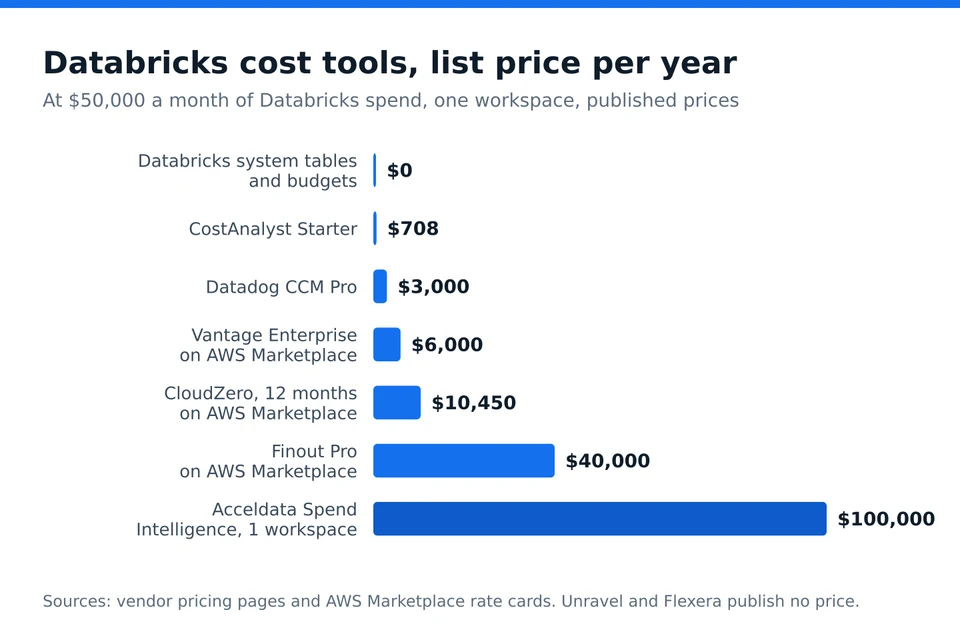
At $50,000 a month of Databricks spend, published list prices run from free for native system tables to about $3,000 a year for Datadog Pro, $6,000 for Vantage Enterprise, $10,450 for CloudZero, $40,000 for Finout Pro and $100,000 per workspace for Acceldata. CostAnalyst Starter is $59 a month. Unravel and Flexera quote through sales.
What happened to Sync Computing Gradient and Overwatch?
Both are gone as standalone options. The Sync Computing team joined Capital One Software in June 2025 to extend Slingshot, and synccomputing.com now redirects to Slingshot, whose 2026 site focuses on Snowflake. Overwatch, the Databricks Labs monitoring project, is deprecated and archived on GitHub, with system tables as the replacement.
Does Databricks cost management include the cloud VM costs?
Not for classic compute. Databricks bills DBUs, and your cloud provider bills the EC2, Azure VM or GCE instances separately, so system tables, budgets and the usage dashboard show only the DBU half. Serverless compute is different because its DBU rate includes the infrastructure. A complete view needs the cloud billing export joined to the cluster tags.
What is the cheapest way to allocate Databricks costs to teams?
Enforce custom tags with compute policies and serverless usage policies, then group system.billing.usage by those tags, which costs only the query DBUs. When shared clusters and warehouses make tags insufficient, or finance wants Databricks next to AWS and SaaS, a reporting tool is cheaper than building reallocation rules yourself; Vantage and CostAnalyst start under $100 a month.
Keep reading
See your savings in dollars
Upload your cloud billing export and get a prioritized savings plan. Money never moves. Create your account and get started.