BigQuery Cost Optimization Tools and BigQuery Cost Monitoring Software Compared With Prices
A BigQuery bill has two halves that need different tools: compute, billed either per TiB scanned or per slot-hour, and storage, billed per GiB on a logical or physical model. Most products on this list are strong on one half and quiet on the other, and only a few will actually change a reservation or a billing model for you. Here are eleven options with the prices they publish, sorted by what they can do to the invoice. We build one of them and our row says where it does not fit.
projected this month if unattended
Spend by team
Budget forecast
The short answer
The best BigQuery cost optimization tool depends on how much you want automated. Start with Google's free controls: INFORMATION_SCHEMA.JOBS for cost per query and user, the slot recommender for edition and autoscaling settings, and maximum bytes billed plus custom quotas to cap on-demand queries. When you want slots, billing models and storage switched for you, Rabbit, SELECT by DoiT, Alvin and Revefi act on BigQuery automatically, and DoiT, Unravel and Paradime Radar give deeper recommendations and alerts. Published prices run from free tiers at Revefi, Alvin and Masthead to Paradime Radar from 899 a month and SELECT from $1,499 a month; Rabbit, Unravel and DoiT's BigQuery edition quote. The first decision is not the tool but the billing model: on-demand costs $6.25 per TiB scanned, while Enterprise edition slots cost $0.06 per slot-hour, so a workload that uses fewer than about 104 slot-hours per TiB scanned is cheaper on editions.
Running Databricks next to BigQuery? Our comparison of Databricks cost optimization tools prices the DBU side of the data platform bill the same way.
CostAnalyst is on this list. We do not change BigQuery reservations, queries or storage settings, and we do not read your BigQuery jobs. We read the Google Cloud billing export you upload and show BigQuery spend next to the rest of your cloud and SaaS bill. If you want slots tuned automatically, one of the other tools here is the better buy, and we say which.
How we compared
Five things that actually separate these tools
Which billing model are you on, and should you be
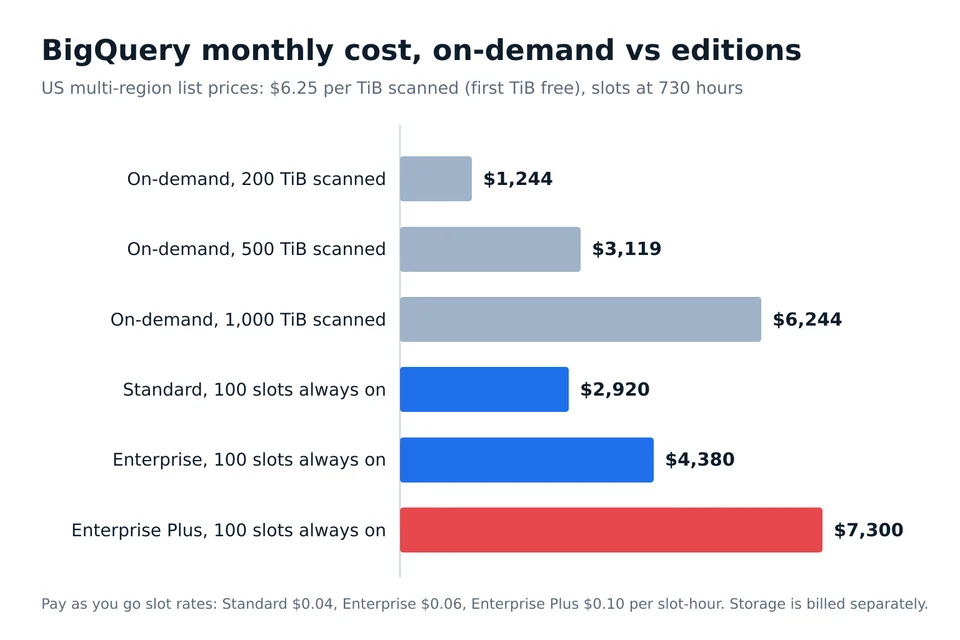
Every BigQuery saving starts here. On-demand bills $6.25 per TiB scanned in the US multi-region with the first TiB free each month. Editions bill slot-hours: $0.04 for Standard, $0.06 for Enterprise and $0.10 for Enterprise Plus on pay as you go, with 1-year and 3-year commitments on Enterprise and Enterprise Plus only. Divide $6.25 by the slot rate and you get the break-even: about 156 slot-hours per TiB on Standard, 104 on Enterprise and 62.5 on Enterprise Plus. Pull total_slot_ms and total_bytes_billed from INFORMATION_SCHEMA.JOBS for a month and you know which side of that line each project sits on, before any tool is involved. A good tool runs that comparison continuously and per project; a weak one only reports the total.
Does it report, recommend, or change BigQuery for you
Three different products sit under one label. Reporting tools show cost per query, user, dataset or dbt model. Recommendation tools add the slot baseline, autoscaling maximum or partitioning change to make. Acting tools change reservations, route queries between on-demand and reservations, or switch dataset storage billing without a ticket. Google's slot recommender is free but stops at a recommendation; Rabbit, SELECT by DoiT, Alvin and Revefi say they act automatically, usually opt-in per optimizer. The acting tools need write permissions on reservations or datasets, which is a security review, not a checkbox.
How autoscaling is billed, because it is billed on scaled slots
Google's documentation is blunt: you are charged for the number of scaled slots, not the number of slots used, slots always scale in multiples of 50, and autoscaled capacity is retained for at least 60 seconds. A five-second query that bursts a reservation by 50 slots bills 50 slot-minutes. Short, spiky dashboards on an autoscaling reservation can therefore cost more than the same queries on-demand. A tool worth paying for measures idle scaled capacity per reservation and tells you when the maximum or the baseline is the problem.
Does it touch storage, the half of the bill most tools ignore
BigQuery storage in the US multi-region costs $0.02 per GiB a month for active logical bytes and $0.01 long-term, or $0.04 and $0.02 for physical, compressed bytes, with long-term pricing after 90 days without modification. Physical billing wins when your data compresses better than about two to one, but it also charges for time-travel and fail-safe bytes, so heavily updated tables can flip the result. The switch is set per dataset. Only a few tools on this list model it per dataset, and SELECT says its Storage Optimizer makes the switch for you.
How the vendor charges, and whether it scales with your bill
BigQuery tools price in four ways: free tiers capped by spend or tables, flat monthly subscriptions, a percentage of data platform spend, and a share of the savings they produce. A share of savings is easy to justify the first year and expensive once the easy wins are banked. A percentage of spend rises with your bill even when the tool did nothing new. Ask every vendor what you pay in month thirteen.
At a glance
11 BigQuery cost optimization tools compared
← Scroll to see all columns →
| Tool | Best for | Reports, recommends or acts | The BigQuery catch | Pricing |
|---|---|---|---|---|
| Native BigQuery controls | Every BigQuery customer, as the free baseline | Reports cost per job, recommends slots, caps on-demand bytes; changes nothing on its own | Recommendations stop at a button that opens the reservation page; nobody applies them for you | Free |
| DoiT (BigQuery Intelligence and PerfectScale for BigQuery) | Google Cloud customers who buy through DoiT and want recommendations plus reseller support | Reports and recommends: unused tables, partitioning and clustering, slot purchases, right-sized reservations | BigQuery edition and PerfectScale prices are bespoke; dashboards refresh daily, not in real time | Cloud Intelligence Essentials free, BigQuery edition bespoke pricing |
| SELECT by DoiT | Data teams that want reservations, query routing and storage billing changed automatically | Acts: Storage Optimizer, Reservations Manager and Query Router change BigQuery settings for you | BigQuery support was announced in April 2026 as early access; confirm it is generally available for your setup | Starting at $1,499 a month, custom quote |
| Rabbit | Large Google Cloud estates that want BigQuery acted on automatically, optimizer by optimizer | Acts on production BigQuery automatically, opt-in per optimizer: slots, pricing model, storage, reservations, caching, SQL | No published price; enterprise pricing applies above roughly $500K a month of cloud spend | Not published, tied to cloud bill and savings, 30-day free trial |
| Alvin | Teams that want query-level routing and rewrites paid only from savings | Acts: routes each query to the cheaper billing model and rewrites queries automatically | The savings percentage is not published | Savings Report $0, Optimizer a percentage of savings |
| Revefi | Smaller BigQuery estates that want a free start and automatic slot reservations | Acts or assists: auto slot reservation and fixes applied automatically or with approval | Paid plans scale as a percentage of data platform spend | Starter free under $50K combined annual spend, paid plans a % of data platform spend |
| Unravel Data | Platform teams running BigQuery editions who want reservation and SQL recommendations | Recommends: reservation baseline and max settings, SQL anti-patterns, custom quotas | Price is based on slot consumption with no dollar figures; automated changes are not documented | Free to get started, then annual or pay as you go based on slot consumption |
| Paradime Radar | dbt-heavy analytics teams that want cost dashboards and spike alerts | Reports and alerts: cost dashboard, high-cost users and queries, slot usage, anomaly alerts | No automated slot or reservation changes documented | Radar starts at 899 a month, 14-day free trial |
| Masthead Data | Data teams that want BigQuery observability with cost insights per table | Reports: data observability, cost insights and SQL suggestions | Priced per Google Cloud project and table count; cost features are secondary to observability | $0 up to 49 tables, $189 per GCP project a month up to 599 tables, Business on request |
| Vantage | Teams that want BigQuery in one multi-cloud cost report, cheaply | Reports BigQuery spend from the billing export by resource; no BigQuery optimization | Sees billing lines, not jobs, slots or queries | Free to $2,500 tracked spend, Pro $30, Business $200 a month, Enterprise custom |
| CostAnalyst | Finance and FinOps teams that need BigQuery spend explained next to the rest of the bill | Flags BigQuery cost growth, anomalies and run-rate from the billing export you upload; changes nothing | Works from the Google Cloud billing export, not from BigQuery jobs or slots | $59, $179 and $479 a month billed yearly, published |
Vendors change pricing and packaging often, so confirm the current figure before you buy.
Tool by tool
What each tool is genuinely best at
Native BigQuery controls
Best for: Every BigQuery customer, as the free baseline
Google gives you more than most teams use. INFORMATION_SCHEMA.JOBS keeps 180 days of history with total_bytes_billed and total_slot_ms per job, which is enough to rank users, service accounts and scheduled queries by cost. The slot recommender inside the slot estimator reads 30 days of history at P99 and suggests commitments and autoscaling settings for editions, at no charge. Maximum bytes billed makes an on-demand query fail without charge when its estimate exceeds the limit, and custom quotas cap TiB per project per day (200 TiB by default) and per user. Cloud Billing budgets alert but do not stop BigQuery spend. What is missing is the person who reads all of it every week.
Native BigQuery controls compared to CostAnalystDoiT (BigQuery Intelligence and PerfectScale for BigQuery)
Best for: Google Cloud customers who buy through DoiT and want recommendations plus reseller support
DoiT's BigQuery dashboards, formerly BigQuery Lens, break spend down by project, user and query and add recommendations for unused tables, partitioning and clustering, and buying slots for heavy on-demand projects, plus anomaly detection. Widgets update daily at 01:00 UTC. PerfectScale for BigQuery, from DoiT's acquisition of PerfectScale, targets unused reservation capacity and right-sizing, with a free trial and no published price. The Essentials tier of Cloud Intelligence is free; the BigQuery edition is quoted. It suits teams already buying Google Cloud through DoiT.
DoiT (BigQuery Intelligence and PerfectScale for BigQuery) compared to CostAnalystSELECT by DoiT
Best for: Data teams that want reservations, query routing and storage billing changed automatically
SELECT built its name on Snowflake and announced automated BigQuery optimization in April 2026, with general availability planned for the third quarter. Three automated layers do the work: a Storage Optimizer that switches datasets from logical to physical billing where it pays, a Reservations Manager that adjusts slots continuously, and a Query Router that sends each query to on-demand or a reservation, whichever is cheaper. Its pricing page starts at $1,499 a month. For a team spending five figures a month on BigQuery, that is the most complete automation on this list with a published starting price.
SELECT by DoiT compared to CostAnalystRabbit
Best for: Large Google Cloud estates that want BigQuery acted on automatically, optimizer by optimizer
Rabbit is the most Google-native of the automation vendors and says plainly that it acts on production BigQuery automatically, with automation switched on per optimizer so you can start with recommendations and widen it later. Its optimizers cover slots, the billing model, storage, reservations, caching and SQL, and it also covers other Google Cloud services. Pricing is tied to your cloud bill and to the savings it automates, with a 30-day trial and enterprise terms above about $500,000 a month of cloud spend. It is listed on Google Cloud Marketplace, which helps if you burn down a commit.
Rabbit compared to CostAnalystAlvin
Best for: Teams that want query-level routing and rewrites paid only from savings
Alvin started in data lineage and now sells a BigQuery optimizer that sends each query to on-demand or a reservation depending on which is cheaper for that query, and rewrites queries automatically. The free Savings Report shows what it would save before you commit. The Optimizer is priced as a percentage of savings, billed monthly with no charge for a proof of concept, but the percentage itself is not on the page, so get it in writing.
Alvin compared to CostAnalystRevefi
Best for: Smaller BigQuery estates that want a free start and automatic slot reservations
Revefi covers BigQuery, Snowflake, Databricks and Redshift and pairs cost work with data quality monitoring. On BigQuery it offers automatic slot reservation and applies fixes automatically or with an approval step. The Starter plan is free for teams whose combined annual data platform spend is under $50,000, which makes it the easiest tool here to try on a real bill. Above that, pricing is a percentage of data platform spend, so it grows with your bill.
Revefi compared to CostAnalystUnravel Data
Best for: Platform teams running BigQuery editions who want reservation and SQL recommendations
Unravel adapted its Databricks and Spark observability product to BigQuery editions pricing, with recommendations for reservation baselines and maximums, SQL anti-patterns and custom quotas. It is strongest for teams that want an engineer-facing tool explaining why a job is expensive. Getting started is free; paid use is billed annually or pay as you go based on slot consumption per month, without published dollar figures. We found no documentation of automated changes, so treat it as a recommendation tool.
Unravel Data compared to CostAnalystParadime Radar
Best for: dbt-heavy analytics teams that want cost dashboards and spike alerts
Paradime is an analytics engineering platform built around dbt, and Radar is its cost module. For BigQuery it shows daily spend, the users and queries driving it, and slot usage, with alerts on spikes and anomalies. Radar starts at 899 a month on Paradime's pricing page, with a 14-day trial. It is a monitoring product: it tells the analytics team which model to fix, and someone on that team still fixes it.
Paradime Radar compared to CostAnalystMasthead Data
Best for: Data teams that want BigQuery observability with cost insights per table
Masthead is a data observability tool for BigQuery that also surfaces cost insights and SQL suggestions. Its pricing is the most transparent on this list: free per Google Cloud project up to 49 tables, $189 per project a month up to 599 tables, and a Business plan on request. Buy it for pipeline reliability with cost as a bonus, not as your main cost tool.
Masthead Data compared to CostAnalystVantage
Best for: Teams that want BigQuery in one multi-cloud cost report, cheaply
Vantage reads the Google Cloud billing export and shows BigQuery cost by project and resource next to AWS, Azure, Kubernetes and SaaS spend. It does not look inside BigQuery, so it cannot tell you which query or user drove the bill. Its tiers are published: free up to $2,500 of tracked spend, Pro at $30 a month, Business at $200 a month and custom Enterprise. It is a good reporting layer and not an optimizer.
Vantage compared to CostAnalystCostAnalyst
Best for: Finance and FinOps teams that need BigQuery spend explained next to the rest of the bill
CostAnalyst reads the Google Cloud billing export you upload and breaks BigQuery spend into compute and storage by project and team, next to your AWS, Azure and SaaS spend. It flags anomalies before the invoice, shows the run-rate, and shows on the next bill whether a switch to editions, a commitment or a storage change actually saved money. It never connects to BigQuery and never changes a setting. Pair it with the free native controls, or with one of the acting tools above if you want slots tuned for you.
See how CostAnalyst worksHow to choose
Pick by the problem you actually have
You spend under $5,000 a month on BigQuery, mostly on-demand
Use the free controls first: set maximum bytes billed on scheduled queries, add a per-user daily quota, and rank last month's jobs by total_bytes_billed in INFORMATION_SCHEMA. Partitioning and clustering the two or three largest tables usually saves more than any tool would cost. Revefi's free Starter tier is the cheapest way to get automation on top.
Your on-demand bill is growing and you suspect editions would be cheaper
Calculate slot-hours per TiB for each project from INFORMATION_SCHEMA.JOBS. Projects under about 104 slot-hours per TiB are cheaper on Enterprise, under 156 on Standard. Use the free slot recommender to size the reservation, or Alvin or SELECT to route query by query instead of moving whole projects.
You already run reservations and the autoscaler bill looks too high
You are paying for scaled slots in 50-slot steps held for at least 60 seconds. Rabbit, SELECT's Reservations Manager and Revefi adjust baselines and maximums automatically; Unravel and DoiT recommend them. Pick by how much write access your platform team will grant.
Storage is now a big share of the bill
Model logical versus physical billing per dataset, counting time-travel and fail-safe bytes. SELECT's Storage Optimizer switches datasets for you; otherwise compare the TABLE_STORAGE views yourself and switch the datasets that compress better than about two to one.
The analytics team owns BigQuery and works in dbt
Paradime Radar puts cost next to the dbt models that cause it, with alerts on spikes. Masthead adds observability per table if pipeline reliability is the bigger problem.
Finance needs BigQuery explained next to AWS, Azure and SaaS spend
Use a billing-export tool for the cross-cloud view: Vantage if you want published low tiers and engineering reports, CostAnalyst if you want anomalies, run-rate and proof of savings for finance without granting account access. Keep one BigQuery-native tool for the query-level work.
Questions buyers ask
BigQuery cost optimization tools, answered
What is the best BigQuery cost optimization tool?
For most teams, Google's free controls come first: INFORMATION_SCHEMA.JOBS for cost per query, the slot recommender, maximum bytes billed and custom quotas. If you want BigQuery changed automatically, Rabbit, SELECT by DoiT, Alvin and Revefi act on slots, query routing or storage. DoiT, Unravel and Paradime Radar are stronger for recommendations and alerts than for automation.
How can I reduce BigQuery costs?
Cap on-demand queries with maximum bytes billed and custom quotas, partition and cluster your largest tables, and stop selecting every column. Then compare slot-hours per TiB to decide whether editions would be cheaper, size reservations with the slot recommender, and model physical storage billing per dataset. Tools automate those steps, but the steps are the same.
Is BigQuery on-demand or editions cheaper?
It depends on slot-hours per TiB scanned. On-demand costs $6.25 per TiB in the US multi-region, Enterprise edition costs $0.06 per slot-hour, so a workload using fewer than about 104 slot-hours per TiB is cheaper on Enterprise. Scan-heavy, simple queries tend to favor editions; small, compute-heavy queries tend to favor on-demand.
How much does BigQuery cost per TB?
On-demand queries cost $6.25 per tebibyte scanned in the US multi-region and Iowa, and the first TiB each month is free. Storage is separate: $0.02 per GiB a month for active logical storage and $0.01 for long-term in the US multi-region, with the first 10 GiB free each month.
How do I monitor BigQuery costs?
Query INFORMATION_SCHEMA.JOBS for total_bytes_billed and total_slot_ms by user, project and day, and export Cloud Billing data to BigQuery for the invoice view. Set budget alerts, knowing they do not stop spend. Paradime Radar, DoiT and Unravel add dashboards and anomaly alerts, and CostAnalyst flags anomalies from the billing export.
Do Google Cloud budgets stop BigQuery spend?
No. Google's documentation says an alerts-only budget does not cap usage or spending. To stop runaway BigQuery queries, use maximum bytes billed on queries and custom quotas per project or user per day, which make on-demand queries fail once the limit is reached.
How is BigQuery autoscaling billed?
You pay for the slots the autoscaler scales to, not the slots your queries use. Google scales in multiples of 50 slots and keeps scaled capacity for at least 60 seconds, billed per second after that minute. Short, spiky queries can leave you paying for idle scaled slots.
Should I use physical or logical storage billing in BigQuery?
Physical billing costs twice as much per GiB but bills compressed bytes, so it wins when a dataset compresses better than about two to one. It also bills time-travel and fail-safe bytes, which can tip frequently updated tables back to logical. The choice is made per dataset.
Does DoiT charge for BigQuery Lens?
DoiT's Cloud Intelligence Essentials tier is free. Its BigQuery edition, which covers visibility, insights, automated savings and monitors, has bespoke pricing on DoiT's pricing page, and PerfectScale for BigQuery has a free trial without a published price.
Can CostAnalyst optimize BigQuery queries?
No. CostAnalyst does not read BigQuery jobs and does not change slots, queries or storage settings. It reads the Google Cloud billing export you upload, shows BigQuery spend next to your other cloud and SaaS costs, flags anomalies and proves on the invoice what a change saved. Use a BigQuery-native tool for query-level optimization.
Keep reading
See your savings in dollars
Upload your cloud billing export and get a prioritized savings plan. Money never moves. Create your account and get started.