Sedai Pricing and What the Sedai Billing Unit Means per vCPU
By the CostAnalyst team
projected this month if unattended
Spend by team
Budget forecast
Sedai does not publish a price. Its pricing page is a quote form, but its FAQ explains the model: Sedai charges 1 Sedai Billing Unit (SBU) for each vCPU the platform manages, on a fixed annual commitment sized to your typical cloud and AI usage, with no overage penalty if you go above it. The only public dollar figure is on AWS Marketplace: a 30-day proof of concept for a one-time $1 activation fee. The production contract is a private offer, and the listing says Sedai does not offer refunds.
We read these terms on 24 October 2026 from sedai.io/pricing and from the AWS Marketplace listing titled Sedai Autonomous Cloud Management Platform (seller Sedai Inc.). Since the rate per SBU is not public, this guide does the next most useful thing: it turns the vCPU unit into numbers you can test a quote against, using the per vCPU rates that Sedai's competitors do publish, and lists the questions that decide what you will actually pay.
How much does Sedai cost?
Sedai costs whatever your SBU count multiplied by your negotiated rate comes to, and that rate is only available from sales. One SBU equals one managed vCPU, so a company with 1,000 vCPUs under management commits to roughly 1,000 SBUs a year. The commitment is fixed for the term, and usage above it is billed at the same rate rather than at a penalty rate.
| What Sedai publishes | Where | What it means for your budget |
|---|---|---|
| Quote form, "based on your unique cloud environment and usage" | sedai.io/pricing | No list price; you need a sales call for a number |
| 1 Sedai Billing Unit per managed vCPU | Pricing FAQ | Your bill scales with managed vCPUs, not with savings or cloud spend |
| Fixed annual commitment, adjustable over time | Pricing FAQ | You pay the committed SBUs for the year even if usage dips |
| No overage penalty; extra usage at the same rate | Pricing FAQ | Growth above the commitment does not cost a premium |
| POC Trial Offer, $1 one-time, 30 days, full features | AWS Marketplace | A real production test before any annual contract |
| "We do not currently offer refunds" | AWS Marketplace | Once the annual contract is signed, the money is committed |
The Marketplace listing also shows three rows named Legacy-Tier-Do-Not-Select at $1,000,000 for 12 months, each marked "currently unavailable." Those are placeholders that stop anyone buying an old tier by mistake. They are not Sedai's price, and you will see them quoted out of context in a few places online.
How does the Sedai Billing Unit work?
The SBU is Sedai's volume unit, and the FAQ gives one example: one SBU for each vCPU the platform manages. That is the same base unit PerfectScale, StormForge and ScaleOps use for Kubernetes, which makes Sedai easier to compare than vendors that price on cloud spend or on a share of savings.
Two things the FAQ does not spell out are worth asking about, because they move the number a lot:
- How serverless and managed services are counted. Sedai optimizes AWS Lambda, Fargate, ECS, storage, databases and Databricks as well as Kubernetes and VMs. A Lambda function has no fixed vCPU count in the way a node does. Ask how SBUs are measured for each service type you plan to connect, and get the method in the order form.
- Whether the count is taken before or after optimization. If Sedai shrinks your clusters by 30 percent, your managed vCPU count falls too. With a fixed annual commitment, a lower count does not lower this year's fee, so size the commitment on where you expect to land, not where you start. The FAQ says the commitment can be adjusted as needs change; ask when and in which direction.
What does 1,000 vCPUs cost with Sedai's competitors?
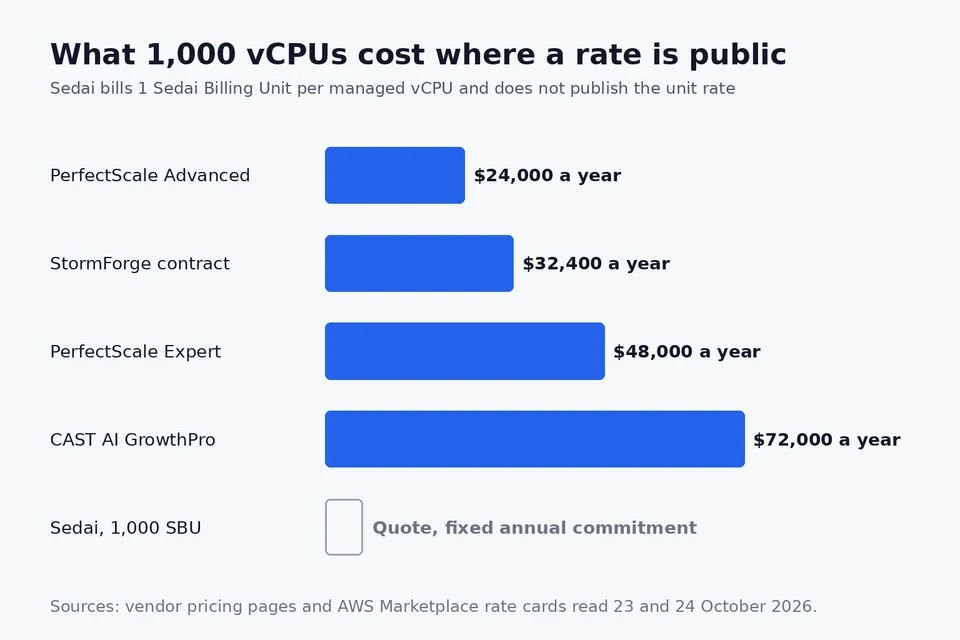
Since Sedai bills per vCPU, the clearest way to judge a quote is to put it next to vendors that publish a per vCPU rate. The figures below are annual list prices at 1,000 managed vCPUs, read from each vendor's pricing page or AWS Marketplace listing.
| Vendor and plan | Published rate | Annual cost at 1,000 vCPUs | Equivalent per vCPU per year | Scope |
|---|---|---|---|---|
| PerfectScale Advanced | Equivalent to $2.00 per monthly vCPU | $24,000 | $24 | Kubernetes, recommendations |
| StormForge Optimize Live, contract | $2,700 a month per 1,000 vCPUs | $32,400 | $32.40 | Kubernetes pods, automated |
| StormForge Optimize Live, pay as you go | $0.0041 per requested vCPU-hour | About $35,900 | About $35.90 | Kubernetes pods, automated |
| PerfectScale Expert | Equivalent to $4.00 per monthly vCPU | $48,000 | $48 | Kubernetes, automated |
| CAST AI GrowthPro | $1,000 a month plus $5 per CPU a month | $72,000 | $72 | Kubernetes nodes and workloads |
| Sedai | 1 SBU per vCPU, rate by quote | Quote | Your quote divided by SBUs | Kubernetes, ECS, Lambda, VMs, storage, data |
Divide your Sedai quote by the number of SBUs and compare the result with the right-hand column. If your workloads are almost all Kubernetes, the automated specialists set the bar between about $32 and $72 per vCPU a year. A Sedai rate above that range needs to be justified by the workloads the specialists cannot touch: Lambda, ECS, Fargate, VMs and data platforms. Our Sedai alternatives guide compares all of these vendors, plus IBM Turbonomic and PointFive, feature by feature.
Is Sedai worth the price?
Sedai is worth it when the savings it ships on the workloads it manages are larger than the SBU fee, and when those savings would not have happened anyway. The simplest test is arithmetic. If your 1,000 managed vCPUs cost about $350,000 a year in compute and Sedai cuts 30 percent, the saving is about $105,000. A fee well below that leaves a clear return; a fee close to it does not.
The harder question is the baseline. Free tools already find part of the saving. AWS Compute Optimizer recommends sizes for EC2, Auto Scaling groups, EBS, Lambda, ECS on Fargate and RDS at no charge, and our Compute Optimizer pricing guide covers what it does and does not do. What Sedai adds is the action: changes applied continuously, in production, without an engineer opening a ticket. Price that, not the recommendation.
Sedai's own figures are worth reading as vendor claims. The Marketplace listing says up to 50 percent lower compute spend and more than 25 million autonomous actions with zero incidents, and the company cites eight U.S. patents on autonomous action. Its pricing page quotes KnowBe4's VP of Engineering saying they saw a positive return after five months. Use the proof of concept to replace those numbers with your own.
How to use the $1 Sedai proof of concept
The 30-day POC is the best pricing tool you have, because it turns an abstract quote into a measured saving on your workloads. Set it up so the result holds up in a budget meeting:
- Agree the baseline first. Export 30 days of cost for the services in scope before Sedai connects, and have both sides sign it.
- Pick workloads that represent the bill. Include your largest Kubernetes services and at least one Lambda or ECS service if those are why you are considering Sedai over a Kubernetes specialist.
- Stay in Copilot. Approve each change with one click during the trial. You learn what Sedai would do and keep control of production.
- Count SBUs during the POC. Ask Sedai to report the managed vCPU count it would bill, so the quote that follows uses a number you have seen.
- Measure after, on the same basis. Compare cost per request or per workload, not total spend, so traffic changes do not distort the result.
Can you buy Sedai through AWS Marketplace?
Yes. Sedai sells on AWS Marketplace, where the public listing carries the $1 POC and the production contract comes as a private offer at a negotiated rate. Buying through Marketplace puts the charge on your AWS invoice, which can count toward an AWS Enterprise Discount Program commitment; confirm eligibility with your AWS account team. Sedai also lists Azure Marketplace among its channels. When the charge arrives on the AWS bill, finance will want to reconcile the Marketplace line against the invoice and the contract, so agree the SBU count and rate in writing before the first month closes.
Questions to ask Sedai before you sign
- What is the price per SBU at our vCPU count and term? Get the unit rate, not just a total, so you can compare it with the table above.
- How are SBUs counted for Lambda, Fargate, ECS, VMs and Databricks? Ask for the method per service type.
- Is the count taken before or after optimization? And when can the commitment be lowered if Sedai shrinks the estate?
- What is the discount for a multi-year term? And is it worth giving up flexibility in a market with several published alternatives?
- Which workloads stay in Copilot by default? Get the approval model in the order form.
- What happens if the measured saving is below the fee? With no refunds, ask for a savings target with a credit or an exit if it is missed.
Know your waste before you take the sales call
Every number in this guide comes back to one figure: how much idle and oversized compute you actually have, and which team owns it. CostAnalyst reads your AWS, Azure and Google Cloud billing exports read-only and shows idle and oversized resources, untagged spend and commitment gaps with an owner attached, from $59 a month. It changes nothing in your accounts. See how cloud waste detection works, or run a free one-time analysis of your own billing export and take the dollar figure into the Sedai conversation.
The short version
Sedai bills 1 Sedai Billing Unit per managed vCPU on a fixed annual commitment with no overage penalty, publishes no rate, offers a 30-day proof of concept for $1 on AWS Marketplace and gives no refunds. Kubernetes specialists that do publish rates cost about $24 to $72 per vCPU a year at 1,000 vCPUs, so divide any Sedai quote by its SBU count and check where it lands. Pay the difference only for the Lambda, ECS, VM and data workloads the specialists cannot automate.
See where your cloud and SaaS money is leaking
Upload your cloud billing export and see your savings in dollars. Transparent pricing, no card to start.