Database Savings Plans Pricing and AWS RDS Savings Plans Rates by Service
By the CostAnalyst team
projected this month if unattended
Spend by team
Budget forecast
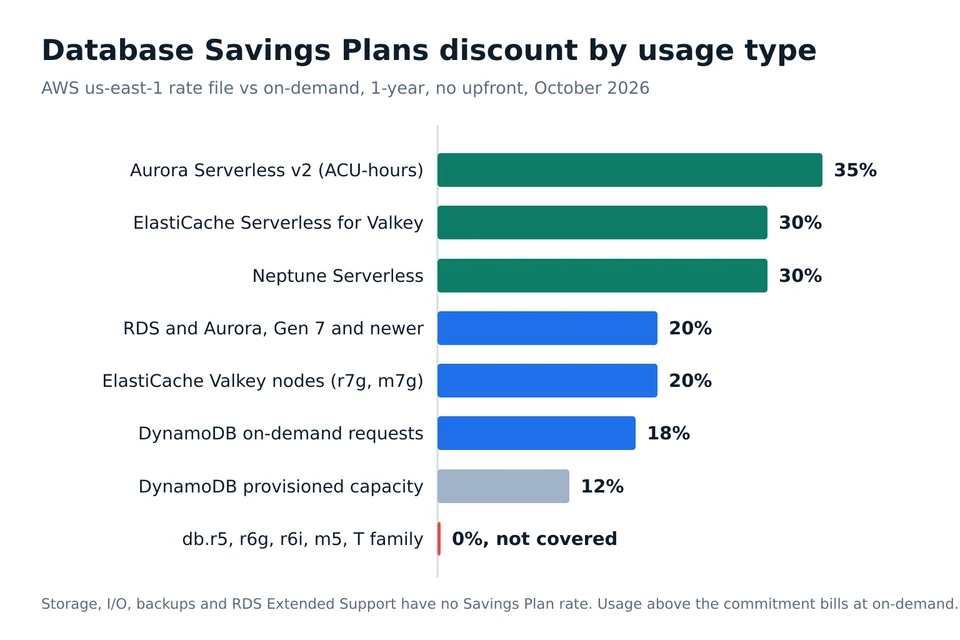
AWS Database Savings Plans take 20% off Generation 7 and newer RDS and Aurora instances, 35% off Aurora Serverless v2, 30% off ElastiCache Serverless for Valkey and Neptune Serverless, 18% off DynamoDB on-demand requests and 12% off DynamoDB provisioned capacity. You commit to a dollar amount per hour for one year, with no upfront payment, and anything above the commitment bills at on-demand. Older instances such as db.r5, db.r6g and the T family get nothing.
AWS launched Database Savings Plans on 2 December 2025 and the rates have not moved since. The figures below come from AWS's published Savings Plan rate file for US East (N. Virginia), dated 7 October 2026, compared line by line with the on-demand price files for the same products. What follows is the rate per service, what a commitment saves on a real fleet, the point where it starts losing money, and who should buy it themselves versus paying a tool to manage it.
Database Savings Plans pricing by service
The discount is fixed per usage type. It does not depend on how much you commit, and there is no larger discount for a longer term because there is no longer term: the only product in the rate file is a 1-year, no-upfront plan.
| Usage, us-east-1 | On-demand | Savings Plan rate | Discount |
|---|---|---|---|
| Aurora PostgreSQL db.r7g.large | $0.276 per hour | $0.2208 per hour | 20% |
| Aurora PostgreSQL db.r7g.large, I/O-Optimized | $0.359 per hour | $0.2872 per hour | 20% |
| RDS for MySQL db.m7g.large, Single-AZ | $0.168 per hour | $0.1344 per hour | 20% |
| RDS for PostgreSQL db.r7g.large, Single-AZ | $0.239 per hour | $0.1912 per hour | 20% |
| Aurora Serverless v2 | $0.12 per ACU-hour | $0.078 per ACU-hour | 35% |
| Aurora Serverless v2, I/O-Optimized | $0.16 per ACU-hour | $0.104 per ACU-hour | 35% |
| ElastiCache Serverless for Valkey, data stored | $0.084 per GB-hour | $0.0588 per GB-hour | 30% |
| ElastiCache for Valkey cache.r7g.large node | $0.1752 per hour | $0.14016 per hour | 20% |
| Neptune Serverless | $0.1608 per NCU-hour | $0.1126 per NCU-hour | 30% |
| DynamoDB on-demand writes | $0.625 per million | $0.5125 per million | 18% |
| DynamoDB on-demand reads | $0.125 per million | $0.1025 per million | 18% |
| DynamoDB provisioned write capacity | $0.00065 per WCU-hour | $0.000572 per WCU-hour | 12% |
Keyspaces is priced like DynamoDB standard, and Aurora DSQL gets 18%. The same plan also covers DocumentDB, DMS, Timestream for InfluxDB and OpenSearch Service. One plan applies to all of them automatically, across engines, instance sizes, deployment options and regions, so moving a database from MySQL to PostgreSQL or from us-east-1 to us-west-2 does not strand the commitment the way an RDS Reserved Instance would.
What Database Savings Plans do not cover
This is where most estimates go wrong. AWS's FAQ limits eligibility to Generation 7 and newer instances, and the rate file has no rates for anything older. In the RDS and Aurora list you will find db.m7g, m7i, m8g, r7g, r7i, r8g and newer families, and nothing for db.r5, r6g, r6i, m5, m6g or any T class. ElastiCache is limited to Valkey, so Redis OSS and Memcached clusters are excluded, and Timestream is limited to InfluxDB.
The rate file also has no rate for storage, I/O requests, backups, snapshots or RDS Extended Support. If you are paying the MySQL 8.0 surcharge described in our breakdown of RDS Extended Support pricing, a Savings Plan does nothing for it. For SQL Server, the plan discounts the instance price only and the license portion still bills at on-demand.
In practice that means the first question is not how much to commit. It is how much of your database bill is on eligible hardware. A fleet that is still mostly on db.r6g can only use a Database Savings Plan after it moves to r7g or r8g, and that move is usually worth doing anyway: on Aurora PostgreSQL the db.r8g.large on-demand rate is the same $0.276 an hour as db.r7g.large.
What a commitment saves on real fleets
Because the discount is a flat percentage, the saving is easy to work out once you know your steady on-demand spend on eligible usage. Three examples at 8,760 hours a year:
| Fleet | On-demand per year | Commitment | Plan cost per year | Saved |
|---|---|---|---|---|
| 10 Aurora PostgreSQL db.r7g.large, always on | $24,178 | $2.208 per hour | $19,342 | $4,836 |
| Aurora Serverless v2 averaging 64 ACUs | $67,277 | $4.992 per hour | $43,730 | $23,547 |
| 40 RDS for PostgreSQL db.r7g.large, Single-AZ | $83,746 | $7.648 per hour | $66,997 | $16,749 |
Note that the commitment is expressed in Savings Plan dollars, not on-demand dollars. Ten db.r7g.large instances cost $2.76 an hour on-demand, but the commitment that covers them is $2.208 an hour, because that is what the same usage costs at the plan rate. AWS's recommendation screen does this conversion for you; spreadsheets built by hand often do not, and over-commit by the size of the discount.
Where a Database Savings Plan starts losing money
You pay the hourly commitment whether you use it or not, and unused commitment in one hour does not carry into the next. The break-even is simple: on a 20% plan, you come out ahead as long as you use at least 80% of what you committed to, measured at plan rates. On a 35% Serverless v2 plan, the line is 65%.
That gives you a practical test before you buy. If there is a realistic chance that more than a fifth of your committed instance usage disappears within twelve months, through a migration off RDS, a consolidation, a rightsizing project or a product being shut down, commit to less. The usual mistake is buying the commitment first and rightsizing second, which locks in the oversized fleet. Do the downsizing first, using one of the RDS rightsizing tools we compared, then commit to what is left.
There is one exit. AWS lets you return a Savings Plan with an hourly commitment of $100 or less within seven days of purchase, as long as it is still the same calendar month. After that, the plan runs for the full year and the terms cannot be changed.
Database Savings Plans vs RDS Reserved Instances
| Database Savings Plans | RDS Reserved Instances | |
|---|---|---|
| Terms | 1 year, no upfront only | 1 or 3 years, several payment options |
| Flexibility | Any engine, size, family, region, and across RDS, Aurora, DynamoDB, ElastiCache and others | Fixed engine and region, size flexibility within a family for some engines |
| Eligible hardware | Generation 7 and newer | Older generations included |
| Serverless | Covered, up to 35% | Not covered |
| Combining | Cannot cover the same workload as an RI | Cannot cover the same workload as a Savings Plan |
AWS's own FAQ describes the split most teams end up with: Reserved Instances on the older db.r5 class that a Savings Plan cannot touch, and a Savings Plan on db.r8g and serverless. A long-lived, unchanging production database on an old generation can still be cheaper on a 3-year RI. Anything you expect to move, resize or upgrade belongs on the plan. Our comparison of Reserved Instances vs Savings Plans covers the same trade-off on EC2.
How to buy a Database Savings Plan
The free route is AWS's own. In the Billing and Cost Management console, open Savings and Commitments, then Savings Plans, then Recommendations, and choose Database Savings Plans. The recommendation is built from your recent on-demand usage and suggests the commitment with the highest saving. The Savings Plans Purchase Analyzer lets you model a different hourly amount and lookback period and shows the effect on cost, coverage and utilization, and Cost Explorer reports utilization and coverage after you buy. Savings appear on the bill within about eight hours.
By default the benefit is shared across every account in your AWS Organization, with the purchasing account's own usage covered first. You can restrict it to the buying account or to groups defined with Cost Categories, which matters if business units are charged back separately and one of them is paying for a commitment another unit consumes. The commitment is also a fixed contractual obligation for the year, which your controller will want reflected in the commitments note of the company's board-ready financial statements.
Paying a tool to manage Database Savings Plans
Commitment managers buy and ladder plans for you in exchange for a share of the saving. Support for Database Savings Plans is still uneven, so check before you sign.
| Option | Database Savings Plans support | Published price |
|---|---|---|
| AWS recommendations and Purchase Analyzer | Yes, native | Free |
| Vantage | Recommendations since February 2026, automated buying through its FinOps Agent | Recommendations free, FinOps Agent 5% of the savings |
| ProsperOps | Early access inside Autonomous Discount Management, announced June 2026 | A percentage of realized savings, rate not published (see ProsperOps pricing) |
| Usage.ai | Covers plans bought through its Flex Commitment Program with cashback protection | Share of savings, no upfront, rate not published |
| nOps | Not documented for database plans at the time of writing | Share of savings, rate not published (see nOps pricing) |
| Archera | Not documented for database plans | Native commitments free, insured commitments carry a premium |
The arithmetic decides it. On the 40-instance fleet above, a 5% fee on $16,749 of savings is about $837 a year. That is cheap if the tool keeps utilization above the break-even line as your fleet changes, and wasted money if your database estate is stable enough that one purchase a year from the AWS console does the job. Teams with fewer than a few dozen databases and steady usage usually do fine buying directly.
Proving the plan lowered the invoice
The part no recommendation screen does is tell finance, month by month, whether the commitment paid for itself, how much database spend is still on-demand because it sits on ineligible hardware, and which team consumed the discount. That is what CostAnalyst is built for. Upload your AWS cost and usage export and it breaks database spend down by service, engine, account and team, flags on-demand database usage that is still uncovered, and shows on the next invoice what the plan actually saved next to your other AWS, Azure, Google Cloud and SaaS spend. It works from the export you upload and never needs access to your AWS account. If you are also comparing broader platforms, our guide to AWS cloud cost management tools prices the alternatives.
Frequently asked questions
Is there a 3-year Database Savings Plan?
No. Database Savings Plans are sold only as a 1-year term with no upfront payment. AWS's FAQ says there is one payment option, and the published rate file contains a single product, 1-year no upfront. If you want a 3-year discount on a database, the only route is an RDS Reserved Instance, which is tied to an engine and region.
Do Database Savings Plans cover db.r6g instances?
No. Eligibility starts at Generation 7, so db.r5, db.r6g, db.r6i, db.m5, db.m6g and every T class are excluded. Eligible RDS and Aurora families include db.r7g, r7i, r8g, m7g, m7i and m8g. Upgrading from r6g to r7g or r8g is the step that makes the plan usable, and on Aurora PostgreSQL r8g.large costs the same on-demand as r7g.large.
Can I combine a Database Savings Plan with RDS Reserved Instances?
Not on the same workload. AWS states the two discounts cannot be combined on one workload, but you can run both in one account: Reserved Instances on older instance classes the plan does not cover, and the Savings Plan on Generation 7 and newer instances and serverless capacity.
Do Database Savings Plans cover storage and RDS Extended Support?
No. AWS's published rate file has rates only for instance hours, serverless capacity units, DynamoDB and Keyspaces requests and capacity, and similar compute usage. Storage, I/O requests, backups, snapshots and the RDS Extended Support surcharge have no Savings Plan rate and keep billing at their normal prices.
See where your cloud and SaaS money is leaking
Upload your cloud billing export and see your savings in dollars. Transparent pricing, no card to start.