Azure VM Cost Optimization Tools and Azure VM Rightsizing Software Compared With Prices
Virtual machines are still the biggest compute line on most Azure invoices, and they are oversized for the same reason everywhere: someone picked a D8s_v5 for a launch two years ago and nobody looked again. Azure gives you a free recommender in Azure Advisor, but it prices every saving at retail rates, ignores the reservations and savings plans you already bought, and never changes a VM for you. Resizing a running VM restarts it, so even a good recommendation waits for a change window. This page compares ten Azure VM rightsizing tools, says which ones only recommend and which ones resize, lists the Azure catch for each, and gives every price that is published, from Azure retail rates to the vendors' own Marketplace listings.
projected this month if unattended
Spend by team
Budget forecast
The short answer
The best Azure VM rightsizing tool for most teams is Azure Advisor, because its resize, shutdown and burstable recommendations are free and read CPU, memory and outbound network over a lookback you can set from 7 to 90 days. It prices savings at retail, ignores your reservations and savings plans, and resizes nothing. Buy IBM Turbonomic or CloudHealth when you want Azure VMs resized from one console, Datadog or Vantage when you want the findings next to your other cost data, and check commitment coverage before you act on any of them.
CostAnalyst is on this list, so here is the plain version first. We do not resize virtual machines and we hold no access to your Azure tenant. We read the Azure cost export you upload, show VM spend by subscription, team, region and series, flag idle and oversized spend and anomalies, and show on the next invoice whether a resize actually lowered the bill. We publish our prices. Everything below about other tools comes from Microsoft Learn, the Azure retail prices API, or from each vendor's own documentation, pricing page and Marketplace listing, read on 7 October 2026.
How we compared
Five things that actually separate these tools
Does the tool recommend a new size, or resize the VM for you
Settle this first, because an Azure resize is a production change. Microsoft documents that changing the size of a running VM restarts it, and if the new size is not available on the hardware cluster hosting the VM you must deallocate it first, which also releases any dynamic IP address. Recommendation tools need billing and monitoring read access and clear security review in days. Tools that resize need rights to modify your VMs and a change process your platform team has signed. That is why most Azure teams start with recommendations and automate later, and why a tool that schedules the restart for you is worth more than one that only produces a longer list.
What Azure gives you for free, and where it stops
Azure Advisor recommends three actions for VMs and scale sets at no charge. Shutdown, when the 95th percentile of CPU is under 3 percent and outbound network under 2 percent over seven days. Resize, to the cheapest SKU where the 95th percentile of CPU and network stays at or below 40 percent and the 99th percentile of memory at or below 60 percent for user-facing workloads, or 80 percent for everything else. And burstable B-series, with the same core count, when credits cover the average load. The lookback can be set to 7, 14, 21, 30, 60 or 90 days. The limits matter more than the features: Advisor prices savings at retail rates, ignores reservations and savings plans, admits a cross-series move can raise your bill, and changes nothing. Microsoft Cost Management shows the spend free, and Start/Stop VMs v2 schedules shutdowns, billed only for the Functions and Logic Apps it deploys.
Will the saving reach the invoice, or is a reservation already paying for that VM
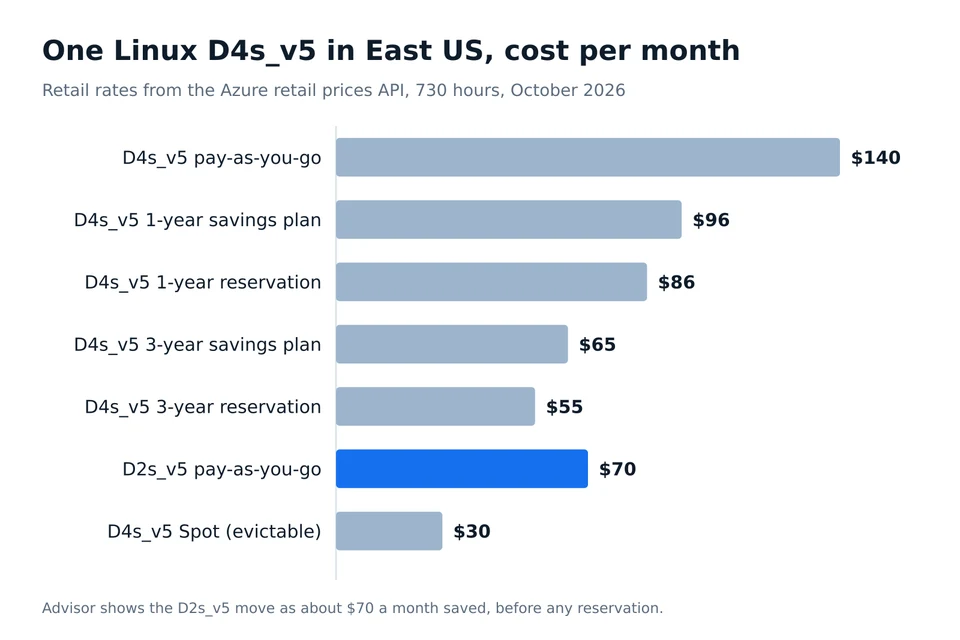
This is the Azure trap. A Linux D4s_v5 in East US costs $0.192 an hour at pay-as-you-go, about $140 a month, so Advisor will show a move to a D2s_v5 at $0.096 as roughly $70 a month saved. If that VM is covered by a three-year reservation ($1,993, about $55 a month) the real saving is close to zero: instance size flexibility lets the Dsv5 reservation cover the smaller VM, and the half it no longer needs sits idle until another Dsv5 picks it up. Savings plans behave the same way, because the hourly commitment of $0.1317 (one year) or $0.0884 (three years) for that size does not shrink when you downsize. Rightsize before you buy commitments, and ask every vendor whether its savings figure is net of your discounts.
Can it see memory, and does it know which workloads are user-facing
CPU rarely breaks after a VM downsize. Memory does, and Azure only reports guest memory when the Azure Monitor agent or VM insights is collecting it. Advisor uses memory for resize recommendations but not for shutdown, and it decides whether a workload is user-facing from its CPU pattern, which changes the target from 40 to 80 percent. CloudHealth scores Azure VMs on CPU, memory and disk. Datadog needs its own agent installed before it will recommend a downsize. Turbonomic sizes on percentiles of real demand. Ask each vendor which memory signal it reads and what happens to a VM that has none.
What the paid tools cost, and in which unit
Azure VM tools price in five different units, so quotes are hard to compare. IBM Turbonomic sells per managed virtual server, $37,909.82 a year for 200 on its public AWS Marketplace contract, the only list price IBM publishes. Kubex sells vCPU tiers from $499 a month for 500 vCPUs. Datadog Cloud Cost Management charges $5 per $1,000 of monitored cloud spend on Pro. Vantage charges a flat $30 or $200 a month by tracked spend. Turbo360, the only Azure-only tool here, shows an indicative price from $249 and sells through Azure Marketplace private offers that can draw down your Microsoft commitment. Sedai and CloudHealth for Azure estates are quoted.
At a glance
10 Azure VM rightsizing tools compared
← Scroll to see all columns →
| Tool | Best for | Recommends or resizes | The Azure catch | Pricing |
|---|---|---|---|---|
| Azure Advisor | Every Azure subscription, as the free baseline | Recommends resize, shutdown and burstable B-series for VMs and scale sets; changes nothing | Savings priced at retail and blind to reservations and savings plans | Free |
| Microsoft Cost Management and Start/Stop VMs v2 | Teams that want VM spend reporting and scheduled shutdown without a vendor | Reports VM cost by scope and tag; Start/Stop VMs v2 stops and starts VMs on a schedule | Neither picks a new size; Start/Stop VMs v2 is a solution you deploy and maintain | Cost Management free for Azure; Start/Stop VMs v2 billed for the Functions, Logic Apps and storage it uses |
| IBM Turbonomic | Large hybrid estates that want Azure VM scaling run as policy next to on-premises and AWS | Generates percentile-based, discount-aware scale actions for Azure VMs and runs them from its Action Center | Sold per managed virtual server, so a small Azure fleet still buys the 200-server block | $37,909.82 a year for 200 managed virtual servers on AWS Marketplace, $22.60 per extra server; Azure deals quoted |
| Sedai | Teams that want AI-driven Azure VM rightsizing with an execution path | Recommends in-family, cross-family and burstable sizes; you submit changes for execution | Its own docs say autonomous mode is not supported for individual Azure VM recommendations | Quote only; the AWS Marketplace listing offers a 30-day proof of concept |
| Kubex (formerly Densify) | Teams that want Azure VM, scale set and AKS sizing in one analysis | Recommends VM and scale set sizes with risk scores; exports JSON or Terraform maps for your automation | Resizing runs through your own pipeline, not the tool | $499 a month or $6,000 a year to 500 vCPUs; $900 a month or $10,800 a year to 1,000 vCPUs |
| CloudHealth (Broadcom) | Enterprises that want Azure VM resizing inside a full multi-cloud cost platform | Scores VMs on CPU, memory and disk with custom policies; can resize Azure VMs from the platform | Expensive as a standalone rightsizing tool; Azure estates are quoted | $45,000 a year to $150,000 of monthly AWS spend on AWS Marketplace; Azure quoted |
| Datadog Cloud Cost Management | Teams already on Datadog that want VM cost findings next to performance | Recommends scaling down VMs and terminating idle ones, plus unattached managed disks | Downsize findings need the Datadog Agent on the VM and billing collected by app registration | Pro $5 per $1,000 of monitored spend a month billed annually; Enterprise $10 per $1,000 |
| Vantage | Smaller teams that want Azure VM rightsizing findings at a flat published price | Surfaces Azure VM rightsizing recommendations with projected savings; changes nothing | Recommendation only, and resource-level detail lives in separate resource reports | Free to $2,500 of monthly tracked spend; Pro $30 and Business $200 a month; Enterprise custom |
| Turbo360 | Azure-only teams and Microsoft partners that want rightsizing bought on Azure Marketplace | Rightsizing and idle-resource detection on Azure resources, with reservation and savings plan guidance | Azure only, and the published figure is indicative; the real price is a private offer | Indicative from $249; Azure Marketplace private offer that can draw down MACC; MSP plan as a share of Azure spend |
| CostAnalyst | Finance and FinOps teams proving what Azure VM rightsizing saved on the invoice | Flags idle, oversized and anomalous VM spend from the cost export; changes nothing | Works from the Azure cost export you upload, not from Azure Monitor metrics | $59, $179 and $479 a month billed yearly, published |
Vendors change pricing and packaging often, so confirm the current figure before you buy.
Tool by tool
What each tool is genuinely best at
Azure Advisor
Best for: Every Azure subscription, as the free baseline
Advisor is where every Azure team should start. It samples CPU, memory and outbound network every 30 seconds, rolls them up to 30 minutes, and recommends a cheaper SKU only where the load fits under its percentile targets, including newer generations and other families, so a D3v2 can become a D2v3 or an E3v2. For scale sets it prefers fewer instances over a new SKU. You can set the lookback from 7 to 90 days and filter recommendations by average CPU per subscription. It shows retail savings, does not net out your reservations or savings plans, and leaves every change to you, so treat its savings total as a ceiling, not a forecast.
Azure Advisor compared to CostAnalystMicrosoft Cost Management and Start/Stop VMs v2
Best for: Teams that want VM spend reporting and scheduled shutdown without a vendor
Cost Management gives you VM spend by subscription, resource group and tag, budgets and exports at no charge, and it is where Advisor findings show up for finance. Start/Stop VMs v2 is Microsoft's free-to-deploy solution for parking development and test VMs at night and on weekends, built on Azure Functions and Logic Apps, and you pay only for those services. Remember that a VM shut down from inside the OS still bills compute: only the stopped (deallocated) state stops the meter. Parking is often worth more than rightsizing for non-production fleets, but it is a different fix.
Microsoft Cost Management and Start/Stop VMs v2 compared to CostAnalystIBM Turbonomic
Best for: Large hybrid estates that want Azure VM scaling run as policy next to on-premises and AWS
Turbonomic treats each Azure VM as a workload it can scale up or down to match real demand, shows the reservation coverage and on-demand cost next to each action, and lets you execute actions from its Action Center or hand them to automation through its Event Driven Ansible collection. It also covers Azure databases and disks. IBM publishes one list price, a 12-month AWS Marketplace contract for 200 managed virtual servers, so expect a quote when you buy for Azure. It earns its price when one policy engine has to cover VMware, AWS and Azure together, not for a few dozen VMs.
IBM Turbonomic compared to CostAnalystSedai
Best for: Teams that want AI-driven Azure VM rightsizing with an execution path
Sedai analyzes Azure VM utilization with agentless or agent-based collection and recommends in-family, cross-family and burstable moves, alongside purchasing advice. Read the documentation before you buy for the word autonomous: Sedai states that autonomous mode is not supported for individual VM recommendations and that autonomous execution for VM groups is not available yet, so today you review opportunities and submit them for execution. It publishes no price on its site, and its AWS Marketplace listing offers only a 30-day proof of concept, so expect a sales process.
Sedai compared to CostAnalystKubex (formerly Densify)
Best for: Teams that want Azure VM, scale set and AKS sizing in one analysis
Kubex, the current name for Densify, collects Azure VMs and scale sets, analyzes long lookbacks to catch seasonal peaks, and returns size recommendations with confidence and risk, plus pod and node pool sizing for AKS. Recommendations come out through its API as JSON or as Terraform maps, which suits teams that change infrastructure through code and want the new size in a pull request rather than a console click. Its two AWS Marketplace tiers are the clearest published price of any paid tool here, and its vCPU count covers cloud compute as well as Kubernetes.
Kubex (formerly Densify) compared to CostAnalystCloudHealth (Broadcom)
Best for: Enterprises that want Azure VM resizing inside a full multi-cloud cost platform
CloudHealth has two Azure VM rightsizing reports that show available and consumed CPU, memory and disk per VM, a policy you can tune to your own thresholds, and the option to resize the VM from inside the platform, along with start, stop and deallocate actions. That makes it one of the few multi-cloud platforms that acts on Azure VMs, not only reports on them. Its public price is an AWS Marketplace card sized on AWS spend, so an Azure-heavy estate gets a quote.
See what CloudHealth (Broadcom) costsDatadog Cloud Cost Management
Best for: Teams already on Datadog that want VM cost findings next to performance
Datadog turns Azure billing and its own agent metrics into recommendations to scale down VMs, terminate idle VMs and delete unattached managed disks, with thresholds and evaluation windows you can tune. It is strongest when the team that owns the VM already watches it in Datadog, because the cost finding and the latency graph sit on one screen. The setup is heavier on Azure than on AWS: billing has to come in through the app registration method and the agent has to be on each VM before downsize recommendations appear. The price scales with your whole cloud bill.
See what Datadog Cloud Cost Management costsVantage
Best for: Smaller teams that want Azure VM rightsizing findings at a flat published price
Vantage added Azure Virtual Machine rightsizing to its Cost Recommendations page, with the projected monthly saving per recommendation and resource reports that list every VM that can be optimized. It sits next to its Azure reservation and unattached disk findings and the rest of your cloud cost reporting. Nothing is resized for you. The attraction is price: tiers are flat and published by tracked spend, and you can evaluate it without a sales call.
Vantage compared to CostAnalystTurbo360
Best for: Azure-only teams and Microsoft partners that want rightsizing bought on Azure Marketplace
Turbo360 is built only for Azure. Its cost product covers rightsizing and idle-resource detection on your own resources, reservation and savings plan guidance, and a unified view across subscriptions and tenants, with a 14-day trial. It sells through Azure Marketplace private offers, which matters if you have a Microsoft Azure Consumption Commitment to burn down, and it has a separate MSP and CSP plan priced as a percentage of Azure spend under management. If you also run AWS or Google Cloud, it covers only part of the bill.
Turbo360 compared to CostAnalystCostAnalyst
Best for: Finance and FinOps teams proving what Azure VM rightsizing saved on the invoice
CostAnalyst reads the Azure cost export you upload and breaks VM spend down by subscription, team, region and series next to your AWS, Google Cloud and SaaS spend. It flags idle and oversized VM spend and anomalies, and shows on the next invoice whether a resize, a reservation exchange or a savings plan actually lowered the bill, which is the number Advisor cannot give you. Pair it with Azure Advisor for the size recommendation, or with one of the resizing tools above if you want the change made for you.
See how CostAnalyst worksHow to choose
Pick by the problem you actually have
You run under a hundred VMs and your engineers apply changes by hand
Use Azure Advisor with a 30-day lookback, collect guest memory with the Azure Monitor agent on the VMs that matter, and work the list in change windows. Spend nothing on tooling until the backlog outgrows the team.
Most of your VMs are covered by reservations or a savings plan
Do not trust any retail savings figure. Map commitment coverage first, rightsize the uncovered VMs, and plan reservation exchanges for the rest. Turbonomic shows discount coverage next to each action.
You want Azure VMs resized for you from one console
Shortlist IBM Turbonomic and CloudHealth, run both on non-production subscriptions first, and compare what each changed against the invoice a month later.
Your infrastructure changes go through Terraform pull requests
Kubex exports its recommendations as Terraform maps, so the new size lands in code review instead of a portal click.
You are Azure only and have a Microsoft commitment to burn
Turbo360 sells through Azure Marketplace private offers that can draw down MACC, which can make the tool cost close to nothing in new budget.
Finance wants the savings proven by someone other than the vendor
Keep the measurement outside the tool that makes the change. Allocate VM spend by team from the Azure cost export before the rollout and compare the same view after it. CostAnalyst does that from the export you upload, at a published price.
Questions buyers ask
Azure VM rightsizing tools, answered
What is the best Azure VM rightsizing tool?
For most teams, Azure Advisor, because its resize, shutdown and burstable recommendations are free and read CPU, memory and outbound network. It prices savings at retail and never applies a change. When you need Azure VMs resized for you, IBM Turbonomic and CloudHealth are the main paid options, and Kubex suits teams that change infrastructure through Terraform.
How does Azure Advisor decide to resize a VM?
Advisor recommends the cheapest SKU where, for user-facing workloads, the 95th percentile of CPU and outbound network stays at or below 40 percent and the 99th percentile of memory at or below 60 percent. For other workloads both limits are 80 percent. The new SKU must keep accelerated networking and premium storage and be available in the region.
Does resizing an Azure VM cause downtime?
Yes. Microsoft states that changing the size of a running VM restarts it. If the new size is not available on the hardware cluster hosting the VM, you must deallocate it first, which also releases dynamic IP addresses. Plan a resize like any production change, in a maintenance window, and test the smaller size on a copy first.
Do Azure Advisor savings include reservations and savings plans?
No. Microsoft documents that Advisor prices savings at retail rates and does not account for reservations or savings plans, so the listed savings can be higher than possible. A cross-series move can even raise your cost when a reservation covers the current series. Check commitment coverage before you act on a recommendation.
How much does an Azure VM cost per month?
It depends on size, region and operating system. In East US a Linux D2s_v5 costs $0.096 an hour, about $70 a month, and a D4s_v5 $0.192, about $140. Windows roughly doubles that unless you use Azure Hybrid Benefit. A three-year reservation brings the D4s_v5 to about $55 a month and a three-year savings plan to about $65.
Should I rightsize Azure VMs before buying reservations?
Yes. A reservation or savings plan commits you to a size or an hourly spend for one or three years, and a later downsize does not lower it. Reservations have instance size flexibility within a series, so a downsized VM uses part of the reservation and the rest sits idle until another VM in that series uses it.
Are B-series burstable VMs cheaper?
Usually, for low average load with short spikes. In East US a Linux B4ms with 4 vCPUs and 16 GiB costs $0.166 an hour against $0.192 for a D4s_v5. Advisor recommends a burstable SKU with the same core count when your average CPU sits under the baseline and the credits cover your peaks. Burstable sizes do not support accelerated networking.
Do I pay for a stopped Azure VM?
You pay for compute until the VM is deallocated. A VM shut down from inside the operating system shows as stopped and still bills; stopping it from the portal, CLI or Start/Stop VMs v2 deallocates it and stops the compute charge. Managed disks and static IP addresses keep billing in both states.
Can I automate Azure VM rightsizing?
Yes, with limits. Azure itself does not resize VMs automatically. IBM Turbonomic executes scale actions from its Action Center or through Ansible, CloudHealth can resize Azure VMs from its platform, and Kubex exports recommendations as Terraform maps for your pipeline. Sedai states autonomous mode is not yet supported for individual Azure VMs.
Is Azure Spot cheaper for VMs that can be interrupted?
Much cheaper. In East US a Linux D4s_v5 Spot VM listed at about $0.041 an hour against $0.192 pay-as-you-go when we checked. Azure can evict it at short notice, so Spot fits batch jobs, CI runners and stateless scale set instances, not databases or single-instance services.
Keep reading
See your savings in dollars
Upload your cloud billing export and get a prioritized savings plan. Money never moves. Create your account and get started.