EC2 Cost Optimizer Tools and EC2 Rightsizing Software Compared With Prices
An EC2 cost optimizer does one of two jobs, and the price gap between them is about a hundredfold. A recommendation tool reads CloudWatch metrics, tells you that an m5.2xlarge averaging 9 percent CPU should be an m5.large, and leaves the change to you. An automation platform makes the change itself, on a schedule or continuously, which means it needs write access to your EC2 fleet and a change process your security team has signed. AWS ships the first kind for free in Compute Optimizer and Cost Explorer, with a few limits buyers only find after rollout. This page compares ten tools that rightsize EC2, says plainly which ones recommend and which ones resize, lists the EC2 catch for each, and gives the price where one is published, including the AWS Marketplace rate cards that most vendors leave off their own websites.
projected this month if unattended
Spend by team
Budget forecast
The short answer
The best EC2 cost optimizer for most AWS teams is AWS Compute Optimizer, because its EC2 rightsizing recommendations are free and its paid 93-day lookback costs about $0.25 per instance a month. It recommends and never resizes, and it is blind to memory unless you install the CloudWatch agent. Buy IBM Turbonomic, Kubex or Sedai when you want the resizing done for you, and use a bill-level tool to prove the saving reached the invoice.
CostAnalyst is on this list, so here is the plain version first. We do not resize instances and we hold no access to your AWS account. We read the AWS billing export you upload, show EC2 spend per account, team and instance family, flag idle and oversized spend and cost anomalies, and show on the next bill whether a resize saved money. We publish our prices. Everything below about other tools comes from AWS pricing and documentation pages or from each vendor's own AWS Marketplace listing, read on 2 October 2026.
How we compared
Five things that actually separate these tools
Does the tool recommend the new size, or resize the instance for you
Settle this before anything else, because it decides the price band and who signs the purchase. Recommendation tools need read access to CloudWatch and billing data, clear security review quickly and cost from nothing to a few thousand dollars a year. Automation tools change instance types for you, and on EC2 that is not a gentle operation: changing the instance type of an EBS-backed instance requires stopping it, so an automated resize is a short outage unless the instance sits behind a load balancer or in an Auto Scaling group that replaces it. That is why Turbonomic, Kubex and Sedai sell policies, approval steps and maintenance windows alongside the engine, and why their contracts start in the tens of thousands. If your engineers will apply ten changes a quarter by hand, a recommendation tool is enough. If you run thousands of instances and the backlog of unapplied recommendations is the real waste, you are buying automation.
What AWS gives you for free, and where it stops
AWS Compute Optimizer produces EC2 instance, Auto Scaling group, EBS, Lambda, RDS and Fargate recommendations at no charge from 14 or 32 days of CloudWatch history, and it now flags idle resources too. The limits are in the documentation rather than the marketing. An instance needs 30 hours of metrics before it gets a recommendation. Spot Instances get none. Auto Scaling groups that run Amazon ECS or EKS workloads get idle findings only, not rightsizing. And the Automation feature, which applies recommendations on a schedule, covers two EBS actions (deleting volumes unattached for 32 days and upgrading volume types such as io1 to io2), not instance resizing. Cost Explorer shows rightsizing recommendations in the Billing console and Cost Optimization Hub collects them across accounts, both without a separate fee. Trusted Advisor adds a low utilization EC2 check, but only on a paid support plan.
Can it see memory, the metric that makes a downsize safe
Default CloudWatch metrics cover CPU, network and local disk, not memory, and memory is usually what breaks after a downsize. Compute Optimizer handles the gap cautiously: AWS says that when memory data is missing it tries to avoid recommending a smaller memory size, which also means it leaves money on the table for memory-light workloads. Two ways to close it: install the CloudWatch agent so memory lands in the CWAgent namespace, which Compute Optimizer reads automatically, or turn on external metrics ingestion from Datadog, Dynatrace, Instana or New Relic if you already pay for one of them. The agent route adds custom metric charges, $0.30 per metric a month for the first 10,000 metrics, so one memory metric on 200 instances is about $60 a month. Ask every paid vendor the same question, because a tool that sizes on CPU alone will recommend changes you cannot safely make.
What the paid tools cost, and in which unit
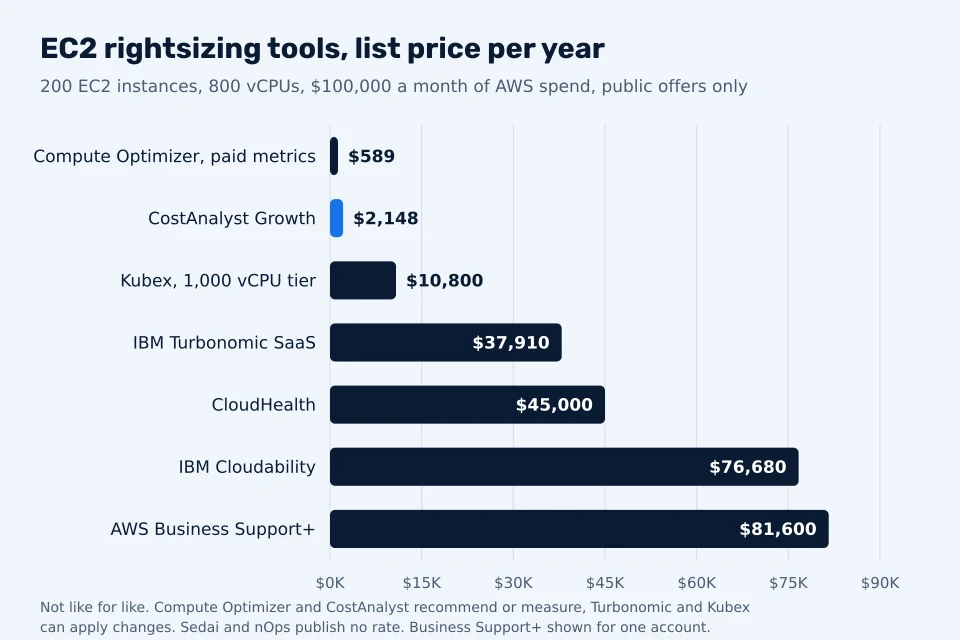
EC2 tools price in four different units, which is why vendor quotes are hard to compare. Compute Optimizer enhanced infrastructure metrics, which extend the lookback to 93 days, cost $0.0003360215 per resource per hour, about $0.25 per instance in a 31-day month, with Auto Scaling groups charged per running instance. Kubex lists two contract tiers on AWS Marketplace: up to 500 vCPUs or 50 GPUs at $499 a month or $6,000 a year, and up to 1,000 vCPUs or 100 GPUs at $900 a month or $10,800 a year. IBM Turbonomic SaaS lists $37,909.82 a year for 200 managed virtual servers, with an overage dimension of $22.60 per extra managed server. CloudHealth lists $45,000 a year to $150,000 of monthly AWS spend, and Cloudability $30,000 a year to $1 million of annual spend. Sedai's listing offers only a $1, 30-day proof of concept, and nOps lists $1.00 placeholder units, so both price on private offers.
Will the saving reach the invoice once commitments are applied
This is the step most rightsizing projects skip, and it is where the reported savings and the bill part ways. If an instance is covered by a regional Reserved Instance, which is size-flexible within its family for Linux, a downsize frees part of the reservation rather than cutting the bill, and the bill only falls if other usage in that family picks up the freed capacity. If it is covered by a Savings Plan, the hourly commitment stays the same; downsizing reduces covered usage, and once usage drops below the commitment you pay for the unused part anyway. So a tool that reports $40,000 of annual rightsizing savings on a fleet that is 80 percent committed may move the invoice by far less until the next commitment renewal is sized down. Measure the before and after on the bill itself, by account and instance family, and resize before you buy or renew commitments, not after.
At a glance
10 EC2 rightsizing tools compared
← Scroll to see all columns →
| Tool | Best for | Recommends or resizes | The EC2 catch | Pricing |
|---|---|---|---|---|
| AWS Compute Optimizer | Every AWS account, as the free baseline for EC2, ASG, EBS and RDS rightsizing | Recommends instance types and idle actions; Automation applies EBS actions only | Blind to memory without the CloudWatch agent; no Spot; idle-only for ECS and EKS node groups | Free; enhanced infrastructure metrics $0.0003360215 per resource-hour, about $0.25 per instance a month |
| Cost Explorer rightsizing and Cost Optimization Hub | Finance and FinOps teams who want EC2 savings in the Billing console | Recommends downsizing or terminating instances; changes nothing | Savings shown before your Reserved Instance and Savings Plan coverage is unwound | No separate charge in the AWS Billing console |
| AWS Trusted Advisor | Accounts that already pay for Business Support+ or Enterprise Support | Flags low utilization EC2 instances; changes nothing | The cost checks are locked on Basic Support | Included with Business Support+, the greater of $29 per account or 9% to 3% of charges a month |
| IBM Turbonomic | Hybrid estates running VMware and EC2 that want resizing automated under policy | Resizes instances, scales and places workloads, with policies and approval steps | Priced per managed server, so idle small instances cost as much to manage as big ones | $37,909.82 a year for 200 managed virtual servers on AWS Marketplace, about $190 per server; $22.60 overage per extra server |
| Kubex (formerly Densify) | Teams that want ML-driven instance and container sizing at a published price | Recommends and can selectively automate instance and container sizing | Tiers stop at 1,000 vCPUs on the public card; larger estates need a private offer | $499 a month or $6,000 a year to 500 vCPUs; $900 a month or $10,800 a year to 1,000 vCPUs, on AWS Marketplace |
| Sedai | Engineering teams that want autonomous rightsizing with a staged path from advice to action | Resizes and tunes scaling autonomously within guardrails you set | No public price; production requires a sales contract | AWS Marketplace offers a $1, 30-day proof of concept; production pricing by private offer |
| nOps | AWS-only teams that also want commitment management from the same vendor | Rightsizing recommendations; Compute Copilot automates spot and commitments | Rightsizing is advice; the automated parts are commitments and spot | No public rate; $1.00 placeholder units on AWS Marketplace, private offers |
| CloudHealth (Broadcom) | Enterprises that want EC2 rightsizing inside a full multi-cloud cost platform | Recommends EC2, EBS and RDS rightsizing with policy-based reports; changes nothing by default | Tiers are fixed blocks of monthly spend, so you pay for the whole block | $45,000 a year to $150,000 of monthly AWS spend on AWS Marketplace, $90,000 to $300,000 |
| IBM Cloudability | Finance-led FinOps teams already in the IBM Apptio stack | Recommends EC2 and other rightsizing inside its reporting; changes nothing | Priced on annual cloud spend tiers that jump at $1 million and $3 million | $30,000 a year to $1M of annual spend, $76,680 to $3M, on AWS Marketplace |
| CostAnalyst | Finance and FinOps teams proving what EC2 rightsizing saved on the AWS bill | Flags idle and oversized EC2 spend from the bill; changes nothing | Works from the billing export you upload, not from CloudWatch metrics | $59, $179 and $479 a month billed yearly, published |
Vendors change pricing and packaging often, so confirm the current figure before you buy.
Tool by tool
What each tool is genuinely best at
AWS Compute Optimizer
Best for: Every AWS account, as the free baseline for EC2, ASG, EBS and RDS rightsizing
Compute Optimizer is the tool to switch on first, in the management account for the whole organization. It ranks EC2 instances and Auto Scaling groups as over-provisioned, under-provisioned or optimized, gives up to three alternative instance types with a performance risk rating, and estimates Graviton migration effort. The default lookback is 14 days and can be set to 32 days free or 93 days with the paid metrics, which matters for month-end and quarter-end peaks. It never changes an instance.
See what AWS Compute Optimizer costsCost Explorer rightsizing and Cost Optimization Hub
Best for: Finance and FinOps teams who want EC2 savings in the Billing console
Cost Explorer lists EC2 instances to downsize or terminate with an estimated monthly saving, and Cost Optimization Hub gathers those findings with Compute Optimizer's across accounts and Regions into one prioritized list. It is the view finance already has access to. It inherits Compute Optimizer's blind spots and, like every recommendation list, reports a saving that may not survive contact with your commitments.
Cost Explorer rightsizing and Cost Optimization Hub compared to CostAnalystAWS Trusted Advisor
Best for: Accounts that already pay for Business Support+ or Enterprise Support
Trusted Advisor's low utilization Amazon EC2 instances check is a blunt filter: instances under a CPU and network threshold on most of the last 14 days. It is worth reading if you already pay for support. It is not worth buying a support plan for, because the paid plan costs a percentage of your AWS bill and Compute Optimizer gives deeper EC2 findings for nothing.
See what AWS Trusted Advisor costsIBM Turbonomic
Best for: Hybrid estates running VMware and EC2 that want resizing automated under policy
Turbonomic models application demand against the supply of compute, storage and network and produces actions it can execute itself, across public clouds, hypervisors and Kubernetes. That reach is why large hybrid estates buy it and why it is overkill for a pure AWS shop with a few hundred instances. IBM sells it on AWS Marketplace as SaaS on 12, 24 or 36 month contracts, and also as a bring-your-own-license edition.
IBM Turbonomic compared to CostAnalystKubex (formerly Densify)
Best for: Teams that want ML-driven instance and container sizing at a published price
Densify renamed itself Kubex and repositioned around Kubernetes and GPUs, but its AWS Marketplace tiers state that vCPU capacity covers cloud compute optimization as well as Kubernetes. It is the cheapest published automation-capable option here at small and mid scale, and it covers Azure, Google Cloud and Oracle Cloud with the same method. Confirm in writing which EC2 actions it will apply automatically and which stay as recommendations.
Kubex (formerly Densify) compared to CostAnalystSedai
Best for: Engineering teams that want autonomous rightsizing with a staged path from advice to action
Sedai sells itself as an autonomous cloud engineer: it learns how each workload behaves, then rightsizes and tunes scaling on EC2, Lambda, ECS and Kubernetes, with modes that run from recommendation only to fully autonomous. The 30-day proof of concept on AWS Marketplace is the cleanest way to test it on a slice of the fleet. Budget for a quote afterwards, because the listing's old paid tiers are marked unavailable.
Sedai compared to CostAnalystnOps
Best for: AWS-only teams that also want commitment management from the same vendor
nOps is an AWS-focused platform whose rightsizing feature reads CloudWatch, and optionally Datadog, to recommend EC2 and Auto Scaling group changes, while its paid automation concentrates on Savings Plans, Reserved Instances and spot through Compute Copilot. Buy it for the commitment side and treat the rightsizing as a recommendation layer. Its pricing is a share of savings with the percentage set in your contract.
See what nOps costsCloudHealth (Broadcom)
Best for: Enterprises that want EC2 rightsizing inside a full multi-cloud cost platform
CloudHealth produces rightsizing recommendations from utilization data inside the same platform that handles allocation, budgets and commitment planning, which is the point of buying it. As a pure EC2 rightsizing tool it is expensive, because the price follows your AWS spend, not the number of instances you size.
See what CloudHealth (Broadcom) costsIBM Cloudability
Best for: Finance-led FinOps teams already in the IBM Apptio stack
Cloudability includes rightsizing recommendations for EC2 and other services next to its allocation, forecasting and commitment features. Like CloudHealth it is bought as a FinOps platform, and the rightsizing comes with it. At $1.2 million of annual spend the example fleet in the chart crosses into the $76,680 tier, a reminder to price these platforms at next year's spend, not this year's.
See what IBM Cloudability costsCostAnalyst
Best for: Finance and FinOps teams proving what EC2 rightsizing saved on the AWS bill
CostAnalyst reads the AWS billing export you upload, breaks EC2 spend down by account, team and instance family next to your other cloud and SaaS spend, flags idle and oversized spend and anomalies, and shows whether a resize changed the invoice once commitments are applied. It sits outside the tool that made the change, so the saving finance sees is not reported by the vendor paid on it.
See how CostAnalyst worksHow to choose
Pick by the problem you actually have
You run a few hundred instances and engineers apply changes by hand
Start with Compute Optimizer for the whole organization, set the lookback to 32 days, and install the CloudWatch agent on the instances you plan to shrink so memory is in the data. Turn on the paid 93-day metrics only for workloads with quarterly peaks; at about $3 per instance a year it is cheap insurance against a bad downsize.
You have thousands of instances and an unapplied recommendation backlog
The waste is the backlog, so buy automation. Compare Kubex, priced per vCPU tier, with Turbonomic, priced per managed server, on your own fleet shape: many small instances favor Kubex, a hybrid estate with VMware favors Turbonomic. Run Sedai's 30-day proof of concept on one service in parallel.
Most of your EC2 spend is covered by Savings Plans or Reserved Instances
Rightsize first and resize your commitments at the next renewal. Until then a downsize frees commitment rather than cutting the bill. Track the unused commitment line on the bill as you go, and do not let a vendor count gross on-demand savings as money saved.
You already pay for CloudHealth or Cloudability
Use their rightsizing reports before buying anything else; you are paying for them. Add an automation tool only if the recommendations are accurate but nobody applies them.
Your EC2 fleet is mostly EKS or ECS worker nodes
EC2 rightsizing tools are the wrong layer. Compute Optimizer gives those node groups idle findings only, and the waste sits in pod requests. Read our EKS rightsizing tools comparison instead.
Finance wants the savings proven by someone other than the vendor
Keep measurement outside the tool that makes the change. Take EC2 spend by account and instance family from the bill before the rollout and compare the same view a month after it. CostAnalyst does that from the billing export you upload, next to your other cloud and SaaS spend, at a published price.
Questions buyers ask
EC2 rightsizing tools, answered
What is the best EC2 cost optimizer?
For most AWS accounts the best EC2 cost optimizer is AWS Compute Optimizer, because it is free, covers EC2 instances, Auto Scaling groups, EBS and RDS, and gives a performance risk rating with every recommendation. It does not apply changes. When you need resizing done automatically under policy, IBM Turbonomic, Kubex and Sedai are the paid options, and Kubex is the only one with a public per-vCPU price.
Is AWS Compute Optimizer free?
Yes. Compute Optimizer recommendations based on 14 or 32 days of CloudWatch metrics are free, and you pay only for the resources and CloudWatch monitoring you already use. The optional enhanced infrastructure metrics feature, which analyzes up to three months of history for EC2, Auto Scaling groups and RDS, costs $0.0003360215 per resource per hour, about $0.25 per instance in a 31-day month.
Does AWS Compute Optimizer automatically resize EC2 instances?
No. Compute Optimizer recommends EC2 instance types but never changes them. Its Automation feature applies only two EBS actions, snapshotting and deleting volumes unattached for at least 32 days and upgrading volumes to a newer type such as io1 to io2, on a schedule you set. To resize instances automatically you need your own scripts or a tool such as Turbonomic, Kubex or Sedai.
Does Compute Optimizer use memory metrics?
Only if you provide them. Compute Optimizer automatically reads memory utilization published by the CloudWatch agent in the CWAgent namespace, or it can ingest EC2 memory metrics from Datadog, Dynatrace, Instana or New Relic. Without memory data it tries to avoid recommending a smaller memory size, which makes its EC2 recommendations safer and less aggressive.
Do I have to stop an EC2 instance to change its size?
Yes, for EBS-backed instances. Changing the instance type requires stopping the instance, changing the type and starting it again, so a resize is a short outage unless the instance sits behind a load balancer or in an Auto Scaling group, where you change the launch template and replace instances gradually. Automation tools schedule this in maintenance windows.
How much does IBM Turbonomic cost?
IBM lists Turbonomic SaaS on AWS Marketplace at $37,909.82 for a 12-month contract covering 200 managed virtual servers, $75,819.62 for 24 months and $113,729.47 for 36 months, with an overage dimension of $22.60 per additional managed virtual server. That works out to about $190 per server per year. A bring-your-own-license edition is also listed.
How much does Densify cost now that it is Kubex?
Kubex, the current name for Densify, publishes two contract tiers on AWS Marketplace: up to 500 vCPUs or 50 GPUs for $499 a month or $6,000 a year, and up to 1,000 vCPUs or 100 GPUs for $900 a month or $10,800 a year. The tiers auto-renew, and larger estates buy through a private offer.
Why did rightsizing not reduce my AWS bill?
Usually because the instances were covered by commitments. Downsizing an instance covered by a Savings Plan reduces covered usage but not the hourly commitment, and a size-flexible Reserved Instance simply covers less of the smaller instance. The invoice falls only when other usage absorbs the freed commitment or when you buy smaller commitments at renewal.
Does Compute Optimizer rightsize Spot Instances?
No. AWS Compute Optimizer does not generate rightsizing recommendations for Spot Instances, and for Auto Scaling groups running Amazon ECS or Amazon EKS workloads it gives idle recommendations only. Spot fleets are usually optimized by diversifying instance types, and container node groups by rightsizing pod requests.
Is Trusted Advisor or Compute Optimizer better for EC2 rightsizing?
Compute Optimizer is better for EC2 rightsizing. It recommends specific instance types with a performance risk rating from up to 93 days of data and costs nothing at its default settings. Trusted Advisor only flags low utilization instances, and its cost checks require a paid support plan, the greater of $29 per account or 9 to 3 percent of monthly charges.
Keep reading
See your savings in dollars
Upload your cloud billing export and get a prioritized savings plan. Money never moves. Create your account and get started.